QAD 2017 Enterprise Edition
>
User Guides
>
System Administration
>
Domain Constants
>
Tracking Changes
Tracking Changes
Use Change Tracking Maintenance (36.2.22) to mark sales order detail fields for change tracking. For line detail information in discrete sales orders, you can:
• Specify which field to track.
• Activate or deactivate tracking.
• Delete any records for fields that no longer require tracking.
• Allow users to enter a reason code and comments when the value of a marked field changes.
• Print the changes, reason codes that explain the changes, and any associated comments on a Booking Transaction Report (7.15.14). For more information on Booking Transaction Report, see
QAD Sales User Guide.
Change Tracking Implementation Overview
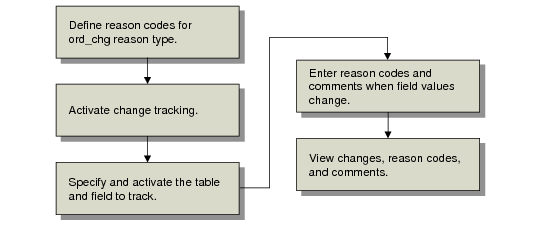
When implementing change tracking, you work with different programs to set up codes, activate change tracking, specify what to track, then view results.
Change Tracking Implementation Flow illustrates the basic change tracking implementation flow.
Change Tracking Implementation Flow
Defining Change Tracking Reason Codes
You must define reason codes that explain changes to sales order detail in Reason Codes Maintenance (36.2.17). You specify ord_chg as the reason type. You must define at least one reason code for the ord_chg type to implement change tracking.
Create reason codes that fit your company’s most common reasons for changes to sales order details. For example, you can create a Delete reason code for deleted orders. See
Using Reason Codes.