Transaction Create Defaults
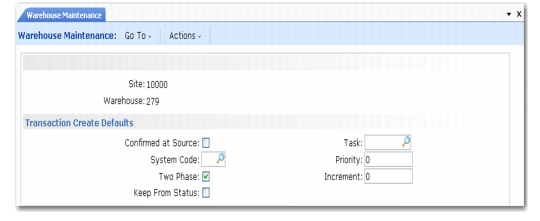
Warehouse Maintenance, Transaction Create Defaults illustrates the Transaction Create Defaults frame.
Warehouse Maintenance, Transaction Create Defaults
The fields in this frame determine the default characteristics of stock movement transactions created in the warehouse. The values you enter here default to all internal routings and work location groups within this warehouse and can be changed as needed.
Confirmed at Source
Indicate how transactions are typically confirmed:
No: Transactions are typically confirmed by the warehouse staff who complete the stock movement at its destination.
Yes: Transactions are typically confirmed by the warehouse staff who initiate the stock movement.
Example: In a warehouse with the three basic work areas—Receipts, Stores, and Dispatch—and two work teams—Receiving and Shipping—the receiving team logs on to their devices in the Receipts area, and the shipping team logs on in the Dispatch area. Put-away transactions are created FROM receipts TO stores, and are confirmed by the receiving team. These transactions are defined with Confirmed at Source set to Yes. Picking transactions are created FROM Stores TO Dispatch, and are confirmed by the Shipping team. These transactions are defined with Confirmed at Source set to No since they are confirmed at their destination.
System Code
Specify the type of screen that confirms transactions:
Blank: Normal screens are used.
RF: Transactions are confirmed using Radio Data Terminals (RDTs), also known as Radio Frequency (RF) terminals.
This field defaults to the internal routings and work location groups that you set up within this warehouse
Two Phase
This field defaults to the internal routings and work location groups that you set up within this warehouse.
No: Inventory movements are created and confirmed in a single step, the single phase.
Yes: Inventory movements are created in one step—the first phase— and confirmed in a second step, the second phase. Between the two phases, the stock is marked as being booked out of the first location and expected in the second location. However, the anticipated inventory levels are only confirmed when the stock is confirmed as arriving at the destination.
Note: Two-phase operation is a much safer way of ensuring precision in inventory management. Single-phase operation should only be used in special circumstances.
Keep From Status
Indicate how the system should set the status of transferred inventory.
No: The inventory takes its status from the new location.
Yes: The inventory status of the transferred inventory retains its original value.
This field defaults to the internal routings and work location groups that you set up within this warehouse.
Task
Specify the task associated with any inventory transaction that is created. This field defaults to internal routings and work location groups that you set up within this warehouse. You use it here simply to specify the most frequent task. Set up task codes in Task Maintenance (4.11.1.1), described in
Defining Tasks.
Priority
Assign a default priority value to transactions. The value you enter here defaults to the internal routings and work location groups that you set up within this warehouse. You normally assign different priorities to different types of transaction. The RDTs select the highest priority task as the next action: the lower the number you specify, the lower the priority.
Increment
Specify the increment that is added to a transaction’s priority as time elapses when you run the increment addition program as a background process.
Specifying an increment prevents the situation where a relatively low priority transaction never reaches the top of the priority list, and therefore, never gets performed. By gradually incrementing the priority, you ensure that even low priority tasks are eventually performed. This field defaults to the internal routings and work location groups that you set up within this warehouse.