Internal Routing Assignment Maintenance
When you have defined the internal routings within a warehouse, you can link specific transaction types to particular internal routings. You can also specify a combination of a transaction type with an item, an item type, or an address relating to a supplier or customer, so that the internal routing is used when that particular combination occurs.
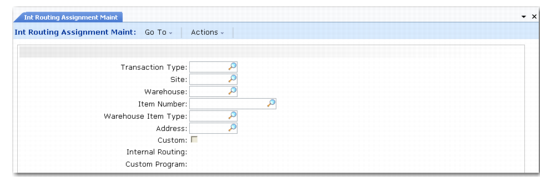
You link transaction types to internal routings using Internal Routing Assignment Maintenance (4.2.9), as shown in
Internal Routing Assignment Maintenance (4.2.9).
Internal Routing Assignment Maintenance (4.2.9)
Enter values in the following fields:
Transaction Type
Enter the transaction type to which you want to assign an internal routing. You can maintain transaction types using Transaction Type Maintenance (4.7.1).
Site
Enter the name of the site.
Warehouse
Enter the name of the warehouse for which you want to assign internal routings.
Item Number
If you want to assign an internal routing to a combination of transaction type and item, enter the item number here. If you leave this field blank, the assignment is valid for all items.
Warehouse Item Type
If you want to assign an internal routing to a combination of transaction type and warehouse item type, enter the item type code here. If you leave this field blank, the assignment is valid for all item types.
The warehouse item type codes are a way of grouping together items that have similar properties. You assign the codes to items using the Item Maintenance options.
Address
If you want to assign an internal routing to a combination of transaction type and address, enter the address code here. If you leave this field blank, the assignment is valid for all addresses. For receipt transaction types, the address relates to the supplier of the item being received; for issue transaction types, the address relates to the customer to whom the goods are to be dispatched.
Custom
Enter Yes in this field if you want to use a custom program; otherwise, enter No. If you enter Yes, the system skips the Internal Routing field and moves to the Custom Program field.
Use custom assignments when there is more than one possible assignment for a transaction type. You create the custom program to determine which internal routing the system should use. When you run the custom program, you must provide the input fields that enable it to decide which IRG to assign.
Internal Routing
Enter the name of the internal routing you want to assign to this transaction type.
Custom Program
If you entered Yes at the Custom field, enter the name of the Custom Program to run for this transaction type.