Work Location Group Maintenance
When you have defined your warehouse, its internal routing groups (IRGs), and storage location groups (SLGs), the next step is to set up all the work location groups (WLGs) within the warehouse using Work Location Group Maintenance (4.3.9). This lets you define a name and a description for each work location group, and to define fields relating to the WLG.
The main purpose of work location groups is to enable you to control which warehouse staff work in which areas of the warehouse using User- Work Location Group Maintenance (4.11.3.13). The second purpose is to define the cycle count and printing fields for each work area.
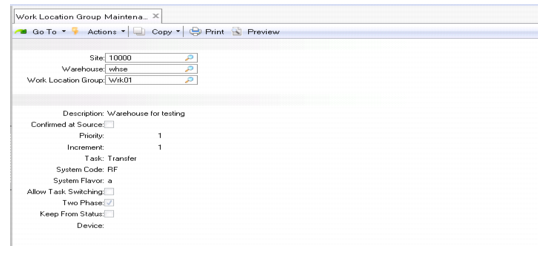
Work Location Group Maintenance (4.3.9) is shown in
Work Location Group Maint (4.3.9).
Work Location Group Maint (4.3.9)
Enter values in the following fields:
Site
Enter the name of an existing site.
Warehouse
Enter the name of an existing warehouse in which you want to maintain work location groups.
Work Location Group
To modify the fields for an existing work location group, enter its name. To create a new work location group, enter its name.
Click Next to accept the site, warehouse, and work location group and move to the second frame.
Description
Enter a brief description (maximum 24 characters) of the work location group.
Confirmed at Source
Enter Yes if transactions in this work location group are confirmed by the warehouse staff who initiate the stock movement. Enter No if transactions are confirmed by the warehouse staff who complete the stock movement at its destination. See
Confirmed at Source.
Priority
This field assigns a priority value to transactions in this WLG. If no priority is assigned to the internal routing, RDTs select the highest priority task at the work location group as the next action. The lower the number you specify, the lower the priority.
Increment
This field specifies the increment that is added to a transaction’s priority as time elapses.
Task
Specify the task associated with any inventory transaction that is created in this WLG. Task codes are set up in Task Maintenance (4.11.1.1).
System Code
Specify the type of screen that confirms transactions in this work location group. Leave this blank for normal screens; enter RF for transactions confirmed using Radio Data Terminals (RDTs), also known as RFs.
System Flavor
Enter the code to define the style and format of screens to be used for displaying information in this work location group other than in the standard system frames. The Flavor codes are set up in Generalized Code Maintenance (36.2.13) and relate to display of information in situations such as fork-lift truck screens or Radio Data Terminals (RDTs).
Allow Task Switching
This field is used to specify for a work location group whether warehouse staff are allowed to switch to a different task. The setting of this field is important whenever any of the task confirmation fields has been set to allow a different value, for example, of a reference or lot/serial number, to that which was expected. You have to specify whether a user who enters a different reference is changing the value for the current task, or switching to another task.
Enter Yes to allow task switching. Upon entry of a different value, such as a reference, the system checks to see whether another task exists with the reference. Enter No to prevent task switching. On entry of a different value, assumes that the value is being changed for the current task.
Two Phase
Enter Yes to specify that inventory movements in this WLG are created in one step, the first phase, and confirmed in a second step, the second phase. Between the two phases, the stock is marked as being booked out of the first location and expected in the second location. However, the anticipated inventory levels are only confirmed when the stock is confirmed as arriving at the destination. If you enter No, inventory movements are created and confirmed in a single step (single phase). The default value that was set up in Warehouse Maintenance is initially displayed.
Note: Two-phase operation is a much safer way of ensuring precision in inventory management. Single-phase operation should only be used in special circumstances.
Keep From Status
This field specifies whether, when an inventory transaction is created and confirmed, the inventory status of the transferred inventory retains its original value by entering Yes here, or takes its status from the new location by entering No here. The default value that was set up in Warehouse Maintenance is initially displayed.
Device
Enter the code to define the device to be used within this work location group, if applicable. If a single device code is not applicable, leave this field blank.
Reporting on Workload by WLG
You can use the Workload by WLG Browse (4.11.12.15) to display workload data by the work location group. You can display data for users, including pending, active, and total tasks, and time to complete tasks for the WLG in both man-hours and estimated hours. In .NET UI, you can also use the browse chart designer to create various charts of the data.