QAD 2017 Enterprise Edition
>
User Guides
>
Warehousing
>
Defining Location Groups
>
Inter-Work Location Group Maintenance
Inter-Work Location Group Maintenance
In situations where inventory movements between two work location groups are not defined by an internal routing. For example, when both WLGs are in the same internal routing group, you must specify the Inter-work location group transaction fields. Otherwise, the system does not know whether to take the transaction properties from the source WLG or the destination WLG.
You do this by using Inter-Work Location Group Maintenance (4.2.21) to specify what the transaction field settings should be for each combination of possible movements from one WLG to another.
Example: If you have three WLGs, A, B, and C, you have six possible types of inter-WLG movement: from A to B, from A to C, from B to A, from B to C, from C to A, and from C to B. Note that if you leave the destination WLG blank, the inter-WLG definition applies to all destination WLGs.
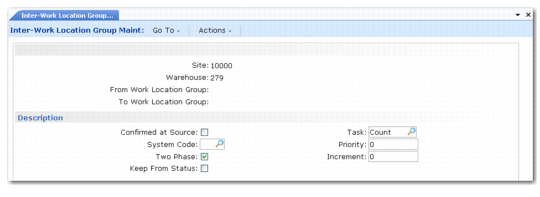
Inter-Work Location Group Maintenance (4.2.21) is shown in
Inter-Work Location Group Maintenance (4.2.21).
Inter-Work Location Group Maintenance (4.2.21)
Enter values in the following fields:
Site
Enter the name of an existing site.
Warehouse
Enter the name of an existing warehouse in which you want to maintain inter-work location group fields.
From Work Location Group
Enter the name of an existing source WLG for this movement combination.
To Work Location Group
Enter the name of an existing destination WLG for this movement combination.
Click Next to display the Description frame.
The fields in the Description frame are the same as those that in Work Location Group Maint, only here they relate to a specific movement between the two WLGs you entered in the first frame.