Location Capacities
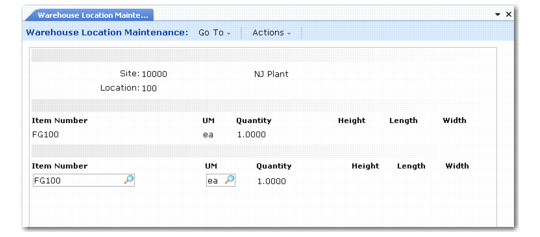
The Location Capacity frame is shown in
Location Maintenance, Capacity.
Location Maintenance, Capacity
The fields in this frame specify item quantities in a particular unit of measure that fits in the location. You can enter multiple lines for different items and different units of measure.
Item Number
Enter the number for the inventory item to which this quantity definition relates. You can leave this field blank if the quantity relates to all items.
Example: You could define how many standard pallets fit in the location, regardless of the items contained on the pallets.
If you entered Yes in the Dedicated field on the previous frame, you must also specify the item to which this location is dedicated.
UM
Enter the unit of measure in which this quantity definition is specified.
Quantity
Enter the quantity of the selected UM that fits in this location.
In Alternate Unit of Measure Maintenance (4.5.1), pallets typically have the Sizing Type field set to R for sizing by reference so that reference numbers are unique to pallets.
If you specify 99999 as the quantity of a UM that is not sized by reference in Alternate UM Maintenance, the system does not calculate the % full for non-functional IRG locations.
Height, Length, Width
If the quantity is sized by reference, you have access to the height, length, and width fields to tell the system how many pallets of a given kind can be stored in that location. The Quantity field is automatically updated with the multiplication of the three dimensions. If a maximum pallet height is defined at the item/warehouse level, the capacity of the location is truncated to take into account the stacking for this item.