QAD 2017 Enterprise Edition
>
User Guides
>
Warehousing
>
Defining Locations
>
Using Check Digits with Locations
Using Check Digits with Locations
Check digit functionality exists for warehouse staff when picking items from storage locations. You can specify a check digit value that warehouse staff enter when they move items from the storage location.
The check digit can be from 1 to 8 alphanumeric characters. The system generates the check digits randomly. This function is useful for warehouses that are not managed with RF devices to ensure that the correct locations are being referenced during picking.
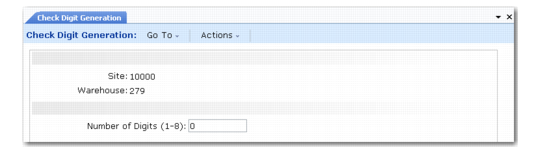
To implement check digit functionality, use Check Digit Generation (4.3.22); see
Check Digit Generation (4.3.22).
Set the following:
• Check Digit to Yes in Storage Location Group Maintenance (4.3.1). See
here.
• Enter a digit value in the Number of Digits field in Check Digit Generation.
Check digit functionality does not exist when moving items to containers during picking.
Check Digit Generation (4.3.22)