Location Groupings and Warehouse Location Data
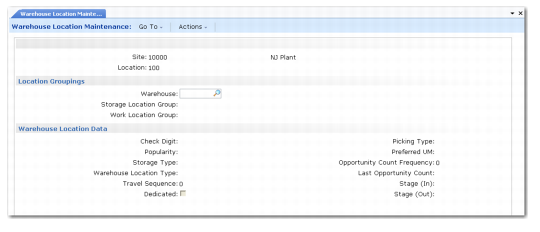
After you click Next, the system displays the Location Groupings and Warehouse Location Data frames; see
Location Groupings and Warehouse Location Data. The field descriptions following the figure describe fields for both frames.
Location Groupings and Warehouse Location Data
Warehouse
Enter the name of the warehouse in which the location is found.
Storage Location Group
Enter the name of the storage location group to which the location belongs.
Work Location Group
Enter the name of the work location group to which the location belongs.
Check Digit
If check digits are in use for this storage location group, enter the code used to confirm the movement of inventory into or out of this location. Leave this field blank if check digits are not in use for this location. See
Using Check Digits with Locations for details.
Popularity
Enter a code to define the relative priority for choosing this location when more than one location could be used to put away inventory. Low alphanumeric values for the Popularity code indicate greater popularity.
Example: A popularity code of AAA indicates a popular location that is easily accessed, while a code of ZZZ indicates an unpopular location, which is perhaps difficult to access. You normally want to put fast moving stock in the low value Popularity code locations, and slow moving stock in the higher ones.
You can base the popularity codes on an ABC analysis of the number of transactions. Item ABC Status Report/Update (3.6.3) provides a report on item-ABC status.
Storage Type
Unless you are doing cycle counts, storage type codes are optional and are used only for information to define different types of storage locations.
Warehouse Location Type
This field is not currently in use; leave it blank.
Travel Sequence
This field is optional. You can use it to assign a number to this location that is used in conjunction with the numbers assigned to other locations to define a travel sequence within the warehouse. This is effective only in an RDT environment using the Next Task function. When the next task is selected, the system considers all outstanding tasks and selects the task where the source location has a travel sequence number closest to the value of the current location’s travel sequence number. You can use this feature to minimize travel within the warehouse. See
Labor Management Workbench.
Note: When working with priorities, the Next Task function first sorts tasks by priority. This means that travel sequences are only efficient for tasks having the same priority.
Dedicated
Enter Yes if this location is dedicated to storage of only one item or product; otherwise, enter No. If you enter Yes, only specific algorithms for dedicated items consider this location for put-away. You must also specify the item for which the location is dedicated in the next frame of Location Maintenance. See Figure 5.3 on
here.
Picking Type
You must enter a valid picking type code for the location. The standard values are FIFO (First In First Out), LIFO (Last In First Out), and blank, which takes the first database record for the location.
Preferred UM
Enter the preferred unit of measure for this location. This can be used by the relevant put-away algorithms; for example, to put away only pallets in a location.
Opportunity Count Frequency
This field is used only if opportunity counts are in use for the storage location group to which this location belongs. If opportunity counts are in use, you can specify a number to control the frequency with which such counts are initiated. When inventory is taken out of the location, the system checks whether the quantity on-hand falls below the threshold level for the item, and also checks the OPC frequency value for the location.
• Enter 0 to allow unlimited numbers of opportunity counts.
• Enter 1 to allow an opportunity count at a frequency of one per day.
• Enter 2 to allow an opportunity count at a frequency of one every two days, and so on.
Last Opportunity Count
This field is for display purposes only. It shows the date of the last opportunity count for this location.
Stage (In)
This field identifies the location that must be used prior to arriving in the current location.
Stage (Out)
This field identifies the location that must be used when leaving the current location.
Stage in and out locations are useful when certain fork-lift trucks or engines are used within the aisle while other equipment is used from another area to the aisle itself. When you make a put-away for instance, you must find the destination location, but the RF terminal shows the movement from the receipt area to the stage in first and then another task is created to move goods from the stage in to the destination location. For issue, when picking goods out of the location to the dispatch area, the first movement is from the location to the stage out and the second is from the stage out to the dispatch area. The two movements have the same transaction number.
The stock is never in the stage location in the system, although physically, it is a mandatory step for the goods in movement. The stage in and out locations may or may not be defined as locations in the system.