QAD 2017 Enterprise Edition
>
User Guides
>
Warehousing
>
Sizing
>
UM Group Maintenance
UM Group Maintenance
You can use UM Group Maintenance (4.5.5) to simplify the process of generating the same conversion factors for a number of different items. To do this, follow these steps:
1 Define a UM group in UM Group Maintenance, which specifies all the conversion factors from the selected base UM to a range of other alternate UMs.
2 Attach this UM group to the relevant items using Item Maintenance functions.
3 Run UM Conversion Generation to attach the required conversion factors to each of the items.
Note: This option is not mandatory. It helps in defining conversion factors. They can still be defined using Alternate UM Maintenance (1.13).
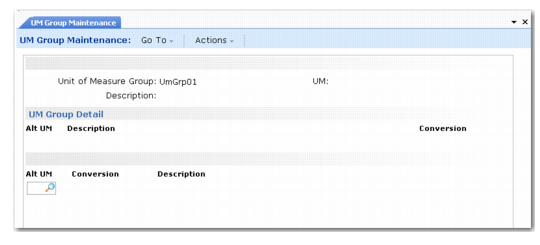
UM Group Maintenance is shown in
UM Group Maintenance (4.5.5).
UM Group Maintenance (4.5.5)
Enter values in the following fields:
Unit of Measure Group
Enter a code to identify the UM group you want to define.
UM
Enter the two-character code for the base UM.
All the conversions in the group are specified in terms of the base UM. If the base UM is EA and the group includes conversion factors for boxes, cartons, and P1 pallets, you define each of these alternate UMs in terms of the number of EA it represents. You do not set up a hierarchy, in which pallets convert to cartons, cartons convert to boxes, and boxes convert to EA.
Description
Enter a description of the UM group, which normally identifies the range of items to which it applies.
Alt UM
Enter the two-character code for the alternate UM.
Conversion
Enter the conversion factor. This is the number of base UM that equates to one of the alternate UM.
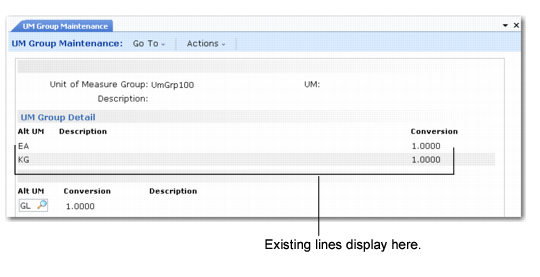
You can enter multiple lines of conversions. After each line, a new line displays, as shown in
UM Group Maintenance (4.5.5), Multiple Conversion Lines.
UM Group Maintenance (4.5.5), Multiple Conversion Lines