AUTO and MANUAL Mode Processing
Engine workfile records are created in either AUTO or MANUAL mode. The following sections describe the processing for each mode.
AUTO Mode
For AUTO processing of an engine workfile, the system first determines the type of logic to use—picking, put-away, location find, cross-docking, inspection, or other logic. After it determines the type of logic needed, it creates the task. The system stores the task record in the TranD table. Also, when a user performs a task, the system starts the task confirmation process. This typically involves the system recording the move of inventory quantities from one location to another, balancing in and out quantities, and moving the task to the transaction history table (TranH).
Depending on the process involved, the system determines the mode or the task from different programs in this order.
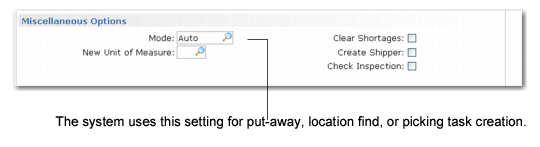
1 For put-away, location find, or picking task creation, the system looks first at any available internal routing defined for the movement in Internal Routing Maintenance (4.2.5). If available, it uses the mode defined in the Mode field in the Miscellaneous frame; see
Internal Routing Maintenance, Miscellaneous Options Frame.
Internal Routing Maintenance, Miscellaneous Options Frame
MANUAL Mode
You use the MANUAL mode to process engine workfiles as you need them processed. This is useful should you need to delay processing of a warehouse task.
Example: You set up the picking process to include a packing step. You want warehouse staff to go from inventory to a packing area and when packing is complete, to a dispatch area. To do this, you define a three-step process that includes:
1 Step 10: storage
2 Step 20: packing
3 Step 30: dispatch
Normally, you want the system to use the AUTO mode for step 20 and step 30; however, you set up step 30 as a MANUAL mode because the shipment is large and the packing staff is short-handed. This lets the packing department take more time.
Note: Although you still need to set up a mode for step 10, movement properties between two steps are defined on the destination step in the system, not the origin step.
Since step 30 is in MANUAL mode, the system does not create the task from the packing area to the dispatch area when staff confirm that goods are moved from the storage area to the packing area. Instead, it creates a request for movement in the form of an engine workfile. The dispatch staff use the Engine Activation (1.6) menu option on the RF device to process the engine workfile. When the engine is activated, the system creates the movement from the packing area to the dispatch area. As an alternative to the RF Engine Activation function, you can also use one of the engine processor programs in Engine Menu (4.7).
Note: If you specify a mode in the Engine and Printing Details frame of Transaction Type Maintenance (4.7.1) or Warehouse Trans Type Maintenance (4.7.5), that value overrides the mode value for the transaction for that specific site or site and warehouse combination.