Print Processing
For printing tags, the system uses the Print Mode fields in the Print Options frame of Internal Routing Maintenance (4.2.5) to determine the mode for printing for created, confirmed, and exception tasks.
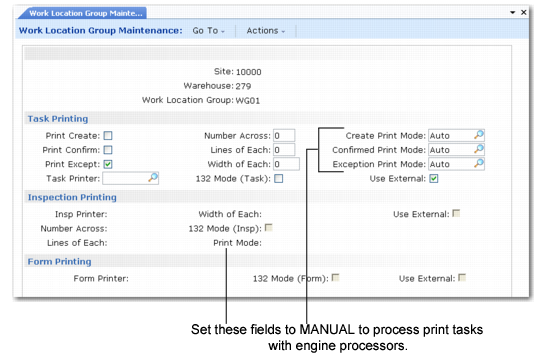
When an internal routing for the movement does not exist, the system determines the print mode for specific movements, such as transfers, from the work location group using the values you specify in the Print Mode fields in each of the printing frames of Work Location Group Maintenance (4.3.9):
• Identification Printing
• Task Printing
• Inspection Printing
Work Location Group Maintenance (4.3.9), Task and Inspection Printing Frames shows the Task Printing and Inspection Printing frames for Work Location Group Maintenance.
Work Location Group Maintenance (4.3.9), Task and Inspection Printing Frames