Print Options
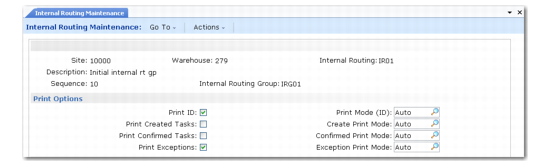
The Print Options frame shown in
Internal Routing Maintenance, Print Options contains fields where you define the printing operations that are performed in relation to inventory transactions for this sequence step in the internal routing.
Internal Routing Maintenance, Print Options
The types of printing are:
• ID, identification of the inventory
• Created tasks
• Confirmed tasks
• Exceptions, when changes have been made to the original transaction
For each of these, you can enter Yes to specify whether the element is printed. The initial values default from the
Printing frame in Warehouse Maintenance, but you can change the values for individual sequence steps of your internal routings. See the field descriptions in Warehouse Maintenance for details on these fields.