QAD 2017 Enterprise Edition
>
User Guides
>
Warehousing
>
Engine Processing
>
Using Engine Processors
Using Engine Processors
Use the engine processors to process MANUAL engine workfiles. You can run the engine processors to process engine workfiles singularly or in batch mode. You can process engine workfiles by engine type, site, date, order, item, transaction number, and so on, and process at a later time.
You can run the processor programs in simulation mode first to view transaction processing by setting Process Records to No. The system displays the engine workfiles to process that meet your selection criteria. Optionally, specify the time in seconds at which you want to repeat engine processing.
After you specify engine workfiles for processing, the system locks the engine workfiles to prevent further processing by other engines. If an engine workfile is already locked and you specified a range, the system skips that engine workfile and continues with the next engine workfile in the range. Once the engine completes processing, it deletes the engine workfiles if you set control options to delete the files.
If the system cannot find engine workfiles to process, it terminates the engine if you have Terminate when no Records set to Yes; otherwise, it repeats engine processing, pausing at the time in seconds that you specify in Repeat Every before starting again. If you set Repeat Every to 0 (zero), the engine terminates when all records are processed. This is different from terminating when no records are found. If Repeat Every is set to 0, the engine can run repeatedly until all records have been processed before it ends the processing.
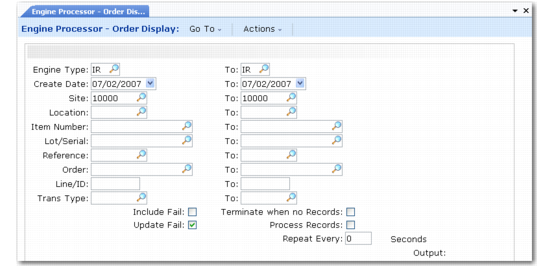
Engine Processor–Order Display (4.7.9) shows the display for Engine Processor-Order Display (4.7.9). Fields for Engine Processor-Date Display (4.7.10) are the same.
Engine Processor–Order Display (4.7.9)
Engine Type and To
Specify a range of the following engine types:
PK: A picking type that the system uses when it must create a picking task. The system creates a picking task when there is an increase in the Qty Picked field in detail allocation. This is typically the result when you print a picklist for orders in the system. When the system creates detail allocation and nothing is picked, it does not create a QAD Warehousing task.
IR: An internal routing type that the system uses when it needs to create a task for a receipt, transfer, or other types of tasks.
OD: A print type to print a tag at task creation.
OH: A print type to print a tag at task confirmation.
OU: A print type to print an unplanned issue tag.
OI: A print type to print a pallet ID tag.
OQ: A print type to print a Quality Inspection tag.
OR: A print type to print pallet IDs.
CF: A confirmation type for confirming tasks.
AU
Create Date and To
Specify a range of creation dates for the engine workfiles.
Site and To
Specify a range of sites for the engine workfiles.
Location To
Specify a range of warehouse locations for the engine workfiles.
Item Number and To
Specify a range of items for the engine workfiles.
Lot/Serial and To
Specify a range of lot or serial numbers for the engine workfiles.
Reference and To
Specify a range of reference numbers for the engine workfiles.
Order and To
Specify a range of order numbers for the engine workfiles.
Line/ID and To
Specify a range of order line numbers for the engine workfiles.
Trans Type and To
Specify a range of transactions for the engine workfiles. You define transaction types in Transaction Type Maintenance (4.7.1) or Warehouse Trans Type Maintenance (4.7.5). See
here and
here.
Include Fail
Indicate whether the system reprocesses engine workfiles that previously failed processing.
No (the default): Do not reprocess failed engine workfiles.
Yes: Reprocess failed engine workfiles.
Update Fail
Indicate whether the system updates the engine workfile with a FAIL status if the engine processing for printing, confirmation, picking, and so on, fails for any reason.
No (the default): The system does not update the engine processor status with a FAIL status.
Yes: The system updates the engine processor status with a FAIL status. The Fail status displays in the Status field of the Process Details frame of the engine workfiles programs. You can change the status there and reprocess the engine workfile that failed to process if you have Include Fail set to Yes.
Terminate When No Records
Indicate whether to terminate the engine processing if the system cannot find records.
No (the default): The system repeats the engine processing based on the number of seconds you specify in Repeat Every.
Yes: The system terminates the engine processing if it cannot find records.
Process Records
Indicate whether the system processes the engine workfiles that match the criteria you specify.
No (the default): The system does not process the engine workfiles. It runs a simulation of the records it will process and reports the records.
Yes: The system processes the records based on criteria you set in the Terminate when no Records and Repeat Every fields.
Repeat Every
Specify a time in seconds at which the system repeats the engine processing. For example, if you specify 600 seconds, the system looks for engine workfiles that match the criteria you specified and processes them if found every 10 minutes. The system repeats this process indefinitely.
If you set this field to 0 (zero), the system processes all transactions for the criteria you specify until no engine workfiles remain.