QAD 2017 Enterprise Edition
>
User Guides
>
Warehousing
>
Engine Processing
>
Modifying Engine Workfiles
Modifying Engine Workfiles
Use the engine workfile programs to select and modify engine workfiles by either order or date:
• Engine Workfile by Order Maint (4.7.13)
• Engine Workfile by Date Maint (4.7.14)
The system creates engine workfiles for different activities and each activity is linked to an engine type.
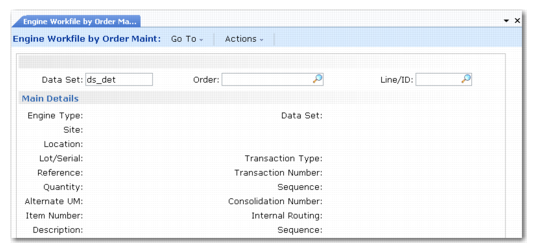
Engine Workfile by Order Maint (4.7.13) depicts Engine Workfile by Order Maintenance. Fields for Engine Workfile by Date are the same, except that you specify the creation date for the engine workfile in the header, rather than the data set and order/line.
Specify data in the header of either program to retrieve an existing engine workfile record. You cannot create a new engine workfile. Click Next to display the Main Details frame and Activity Details frame. Both frames are display only; see
Engine Workfile by Order Maint (4.7.13). Click Next again to display the Process Details frame.
Engine Workfile by Order Maint (4.7.13)
Data Set
Enter the name of a dataset that identifies an existing engine workfile. This field is in the header of Engine Workfile by Order Maint only.
ds_det: Data set for distribution orders
pod_det: Data set for purchase orders
sod_det: Data set for sales orders
wod_det: Data set for work orders
Order
Optionally enter the order for the engine workfile. This field is in the header of Engine Workfile by Order Maint only.
Line/ID
Optionally enter the order line for the engine workfile. This field is in the header of Engine Workfile by Order Maint only.
Create Date
Enter the date the system created the engine workfile. This field in the header of Engine Workfile by Date Maint only.
Engine Type
The system displays one of the following engine types for the engine workfile:
PK: A picking type that the system uses when it must create a picking task. The system creates a picking task when there is an increase in the Qty Picked field in detail allocation. This is typically the result when you print a picklist for orders in the system. When the system creates detail allocation and nothing is picked, it does not create a QAD Warehousing task.
IR: An internal routing type that the system uses when it needs to create a task for a receipt, transfer, or other types of tasks.
OD: A print type to print a tag at task creation.
OH: A print type to print a tag at task confirmation.
OU: A print type to print an unplanned issue tag.
OI: A print type to print a pallet ID tag.
OQ: A print type to print a Quality Inspection tag.
OR: A print type to print pallet IDs.
CF: A confirmation type for confirming tasks.
Site
The system displays the site for the engine workfile.
Location
The system displays the warehouse location for the engine workfile.
Lot/Serial
The system displays the lot or serial number for the engine workfile.
Reference
The system displays a reference number for the engine workfiles.
Quantity
The system displays the quantity for picking or for internal routing to another location.
Alternate UM
The system displays the alternate unit of measure (UM) for items.
Data Set
The system displays the data set for the engine workfiles. See
here.
Trans Type
The system displays the transaction type for the engine workfiles. You define transaction types in Transaction Type Maintenance (4.7.1) or Warehouse Trans Type Maintenance (4.7.5). See
here and
here.
Transaction Number
The system displays either the picking or internal routing transaction number.
Sequence
The system displays the transaction sequence number.
Consolidation Number
The system displays the number of similar records the system consolidates when processing. You specify whether the system consolidates similar records in the Consolidation field in Transaction Type Maintenance. See
here.
Internal Routing
The system displays the current routing code for the engine workfiles.
Sequence
The system displays the current sequence code for the engine workfiles.
Item Number/Description
The system displays the item number and optionally, a description of the item for the engine workfiles.