Example: Sales Order Pick
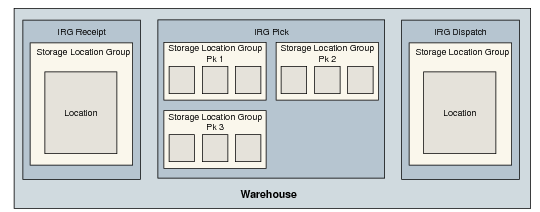
This example takes a simple sales order for 243 EA of component A, and considers how the inventory would be picked from the warehouse setup illustrated in
Warehouse Setup for Sales Order Picking.
Warehouse Setup for Sales Order Picking
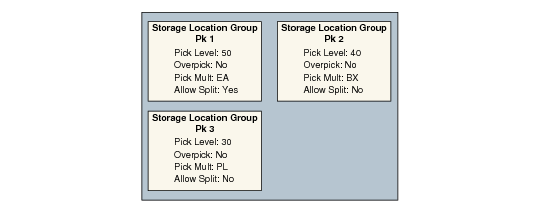
The picking properties for storage location groups Pk 1, Pk 2, and Pk 3 have been set as shown in
Example Picking Properties.
Example Picking Properties
• One PL = 100 EA
• One BX = 20 EA
For the customer order of 243 EA, the result of the pick is shown in
Picking Results.
Picking Results
Result | Reason |
2 PL from SLG Pk 3 | • Pick Level is 30, so look in this SLG first. • Picking multiple pallets is allowed, but pallet split is not. • Therefore, pick 2 pallets to get 200 EA. |
2 BX from SLG Pk 2 | • Pick level is 40, so look in this SLG after SLG 3. • Picking multiple boxes is allowed, so pick 2 BX to get 40 EA. • Splitting a BX is not allowed, so cannot get the remaining 3 EA from this SLG. |
3 EA from SLG Pk 1 | • Pick level is 50, so look in this SLG last. • Splitting is allowed, so take the last 3 EA from SLG 1. |