Example: Work Order Pick
The principles of picking described in the previous section apply to all types of issue transactions. However, in order to illustrate the flexibility that internal routings give you, this section shows different routes that a work order pick could take.
Using the Balance of a WO for Another WO
In this scenario, inventory is left over from one work order, so you want to:
• See whether the remainder can be used in warehouse B (Prod).
• If not, go back to warehouse A (Raw) and pick the inventory from there.
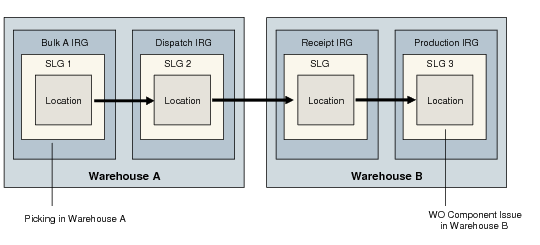
Work Order Picking Example Setup shows an example of work order picking setup.
Work Order Picking Example Setup
In order to set up this movement, you would first need to define a warehouse master list using Warehouse Master List Maintenance (4.1.5). The master list defines the source and destination warehouses for the work order pick. For this scenario, a two-step sequence is created for the transaction:
1 Step 1 begins the pick in warehouse Prod.
2 If the inventory for the WO cannot be found in Prod, the system goes to step 2 and picks the inventory from warehouse Raw. The Ultimate warehouse in step 2 tells the system to make an inter-warehouse transfer from Raw to Prod after picking the inventory.
Next, you must set up the internal routings and algorithm assignments shown in the following table:
Picking in Prod | IR: No IR. Algorithm: PK for PICK-WO |
Picking in Raw + Inter-Warehouse Transfer | 1. IR: PICK-WO Step 10: Bulk Step 20: Dispatch 2. IR: ISRC-WO (No steps) 3. IR: IWRC-WO Step 10: Receipt Step 20: Prod |
Algorithm Assignments | PK for PICK-WO in Raw LF for PICK-WO in Raw LF for IWRC-WO in Prod PA for IWRC-WO in Prod |
Because IRs are defined per warehouse, the IR in step 1 is defined in Raw, and the IR in step 3 is defined in Prod. The way that the transaction is created between each warehouse, from Dispatch in Raw to Receipt in Prod, cannot be described in any IR that relates to one warehouse only. Therefore, you must use an external routing to define the transaction properties for all movements that involve an inter-warehouse transfer.
Note: The transaction type IWRC-WO (inter-warehouse receipt) is used to avoid confusion with RCT-WO. Furthermore, IWRC-WO designates an inter-warehouse receipt for the components of a WO, while RCT-PO is the receipt of the finished product after production.
Pick and Move Inventory Between 2 IRGs in Same Warehouse
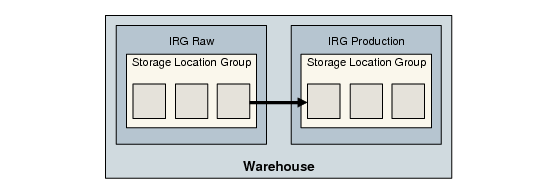
This scenario covers the possibility of having the raw materials area and the production area in the same warehouse; see
Warehouse with Two IRGs. This would be a PICK-WO transaction with:
• An internal routing of two steps (Raw and Production)
• Algorithm assignments of PK, LF, and PA
Pick and Dispatch Within Same IRG
In this scenario, the warehouse has an IRG containing both raw materials and a production area.
Warehouse with Two IRGs
The PICK-WO transaction would therefore, have no IR defined since no movement occurs between IRGs. Instead, you would only assign LF, PK, and PA algorithms to PICK-WO.