QAD 2017 Enterprise Edition
>
User Guides
>
Warehousing
>
Wave Planning
>
Selecting Orders and Creating the Wave
Selecting Orders and Creating the Wave
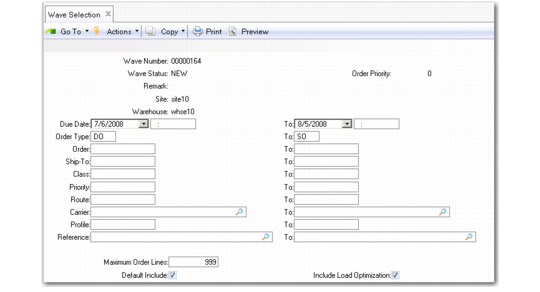
Use Wave Selection (4.15.3) to select orders and create the wave. The system uses the default sort algorithm that you specify in Wave Planning Control (4.15.1.24) to sort through orders. For example, you can specify that the system sort by-order-by-priority.
Note: It is highly recommended that only one person at a time use Wave Selection.
In Wave Selection, fields marked with an asterisk (*) have indexes. This lets you search the indexes and sort by different criteria, display additional information about the orders, add more orders matching the same criteria, and so on.
Example: You select only orders for a specific carrier. You can search all orders for that carrier, then select orders that ship to a specific region of the country and add them to the wave.
Searchable indexes let you create a wave that provides optimal efficiency for your warehouse and optimal performance for the system.
Wave Selection (4.15.3) illustrates Wave Selection.
Wave Selection (4.15.3)