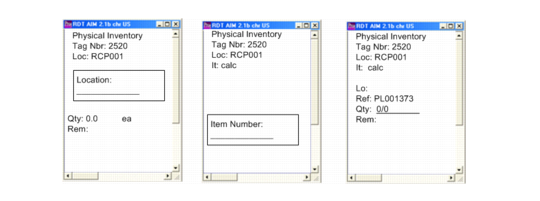
Enter Tag Counts on the RF
Once the tags are created, warehouse staff can use RF Tag Count Entry (1.11) to count items. The RF device presents a tag number to count according to the specified sort method, and staff can either confirm the tag or select another tag by scanning a different tag. The system prompts staff to scan the location, item number, and quantity; see
RF Tag Count Entry (1.11).
RF Tag Count Entry (1.11)
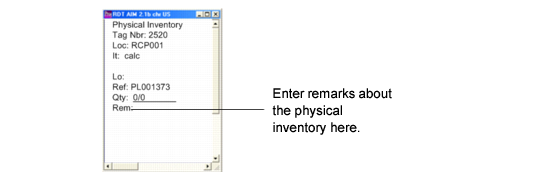
Entering Remarks on the RF
Once the system validates the quantity, the RF device prompts staff to enter a remark about the inventory.
RF Remark Field
The Remark field can be left blank only if it is not defined in Generalized Codes Maintenance (36.2.13).
You can create values in Generalized Codes Maintenance for the PhysicalInvRmks field. When you do, staff must enter one of the predefined values for the field. For example, you can set numerical values that represent the time the tag is counted:
1: The first time the tag is counted: this is the first user count.
2: The first time the tag is recounted.
3: The second time the tag is recounted.
Once generalized codes are established, staff can press F2 on the RF device and receive help. If the generalized codes are defined, the RF device prompts systematically for an existing value in the remark field.