QAD 2017 Enterprise Edition
>
User Guides
>
Warehousing
>
QAD TMS
>
Setting Up a QAD TMS Interface
Setting Up a QAD TMS Interface
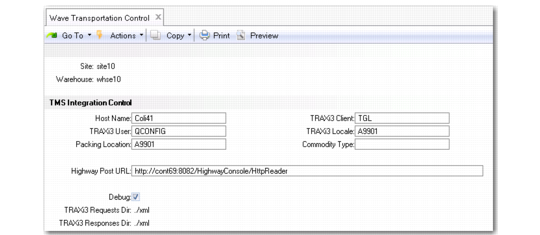
If you use the QAD TMS, you need to set up QAD Warehousing so that it can communicate with QAD TMS. To do this, use the TMS Integration and Messages frames in Wave Transportation Control (4.15.2.24).
Note: Other TMSs may require different setup steps. Consult the documentation for the TMS for setup information.
To set up QAD TMS for QAD Warehousing communication:
• Specify the TMS Integration Control (whtraxpx.p) routine in Local Exit Routine Setup (4.23.10)
• Set parameters in the TMS Integration frame in Wave Transportation Control (4.15.2.24); see
TMS Integration Frame.
TMS Integration Frame
Host Name
Specify the machine from which a request was made. Specify the machine from which a request was made. This is part of the envelope of the XML messages QAD Warehousing sends to QAD TMS. It indicates the origin of the message.
TRAXi3 User
Indicate a valid QAD TMS user (formerly TRAXi3) who processes requests.
Packing Location
Specify the default packing location. The packing location groups a set of shipper carrier accounts for a shipping-point origin.
TRAXi3 Client
Specify a valid TMS client that stores the shipments.
TRAXi3 Locale
Specify the default local printer to use as the destination printer when printing labels and other documents from the TMS.
Commodity Type
Specify a valid TRAX classification group.
Highway Post URL
Specify the URL where the highway component is installed. Highway is the communication system QAD TMS uses. Consult your QAD TMS documentation for specifics about this field.
Debug
Indicate whether the system generates files with messages sent to/from the TMS.
No: Do not generate files with messages.
Yes: The system generates physical files with messages that are sent and received to/from the TMS.
Setting Up Messages
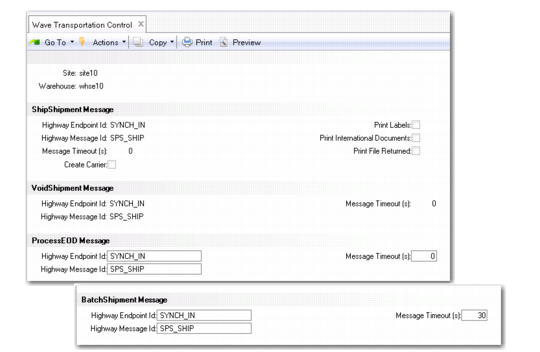
Fields in the four separate message frames correspond to the messages that local exit routines generate for load optimization. You set up some TMS-specific information in the frames.
Message Frames
Highway Endpoint Id
Specify a valid TMS endpoint ID.
Highway Message Id
Specify a valid TMS identifier of messages.
Message Timeout(s)
Specify the number of seconds the system waits for an answer from the TMS for this type message.
Highway Endpoint Id
Specify a valid TMS endpoint ID.
Highway Message Id
Specify a valid TMS identifier of messages.
Message Timeout(s)
Specify the number of seconds the system waits for an answer from the TMS for this type message.
Create Carrier
Indicate whether the system creates a carrier when a carrier is not specified in Carrier Service Assn Maint
No: The system does not create a carrier.
Yes: Normally TMS sends the carrier and service in the ship shipment message. The system now creates a record with the ship shipment information from the TMS so that the system can process the end of day (EOD) message.
Print Labels
Indicate whether the system prints labels when the TMS sends a successful rating. Specify the printer in the TMS Locale field.
No: Do not print labels when TMS sends the rating.
Yes: TMS rates the shipment; that is, returns shipment charges, indicating that the TMS processed the shipment data correctly and returns shipment labels you can print.
Print International Documents
Indicate whether the system prints international documents the TMS sends a successful rating. Specify the printer in the TMS Locale field.
Print File Returned
Indicate whether the system returns printed documents embedded in the TMS response.
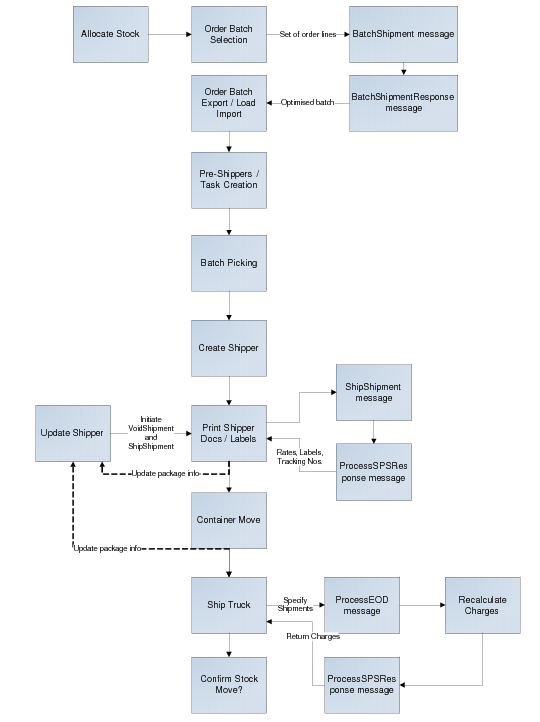
The following graphic depicts the messaging and other functions involved in QAD Warehousing and QAD TMS processing.
Messaging Processing