QAD Solution
For Brazil, you must specify tax usages for all transactions involving legal documents.
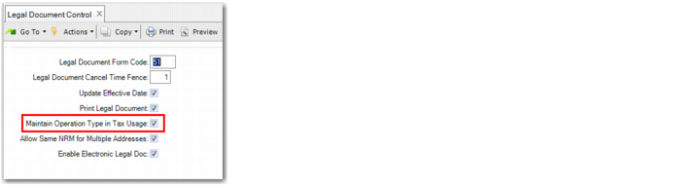
Tax usages and their associated operation types are validated if you select the Maintain Operational Type in Tax Usage field in Legal Document Control (7.10.24). The inventory movement codes Transaction Type and Transaction Flow are also validated against the tax usage operation type.
Setting Up Tax Usage Validation
Legal Document Control
Tax usages are validated if you select the Maintain Operational Type in Tax Usage field in Legal Document Control.
See
Configuring Legal Document Settings for more information on Legal Document Control.
Legal Document Control
Creating Tax Usages
Use Tax Usage Maintenance (29.1.9) to define the tax usages used in Brazilian nota fiscal transactions.
Tax Usage Maintenance
Tax Usage
Enter a code (maximum eight characters) that identifies a group of customers, suppliers, or items subject to special taxation on a specific transaction.
If rates can differ by transaction based on the nature of operation of the supplier or customer or the intended use of the item, set up tax usage codes to reference during transaction entry.
For Brazil, you must specify tax usages for sales or purchasing transactions involving legal documents. Tax usages are validated when if you select the Maintain Operational Type in Tax Usage field in Legal Document Control.
Description
Enter a brief (maximum 24 characters) description of the tax usage code. This field is required.
Multiple language descriptions are supported. The description text you initially enter is associated with the language defined for your user ID. If you respond Yes when prompted to modify other language descriptions, you can specify alternate descriptions in other active languages. The system creates a label term based on your description, which can also be modified in Label Master Maintenance.
Users who have these languages associated will see tax usage descriptions in their language in lookups, reports, and maintenance programs.
The Tax Usage Inquiry and Tax Usage Report can be sorted by description as well as by tax usage if the tax usage is left blank and a description is specified.
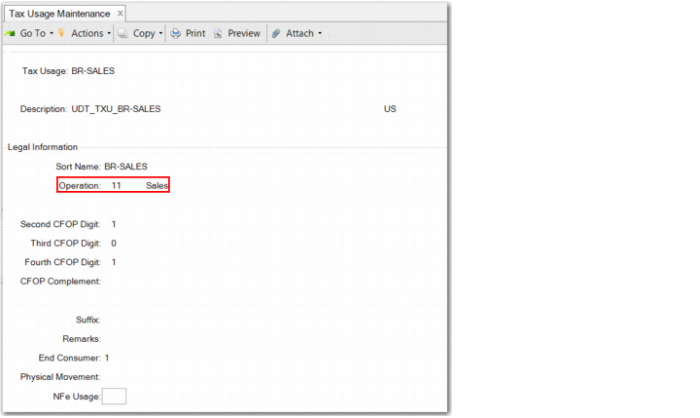
You activate the Legal Information frame in Tax Usage Maintenance when you select the Maintain Operational Type in Tax Usage field in Legal Document Control.
The Legal Information frame is specific to Brazilian legal documents.
Tax Usage Maintenance, Legal Information Frame
Sort Name
Specify up to 24 characters for the sort name.
Operation
Specify the operation type to associate with the tax usage.
Tax usages and their associated operation types are validated if you select the Maintain Operational Type in Tax Usage field in Legal Document Control. The inventory movement codes Transaction Type and Transaction Flow must be validated against the tax usage operation type. The operation types are as follows:
• 1 - Purchases: The operation type associated with tax usages referenced in purchasing transactions. This type causes the Physical Movement field to become active.
• 2 - Other Entries: The operation type associated with tax usages referenced in unplanned receipts. This type causes the Physical Movement field to become active.
• 3 - Sales Returns: The operation type associated with tax usages referenced in sales return transactions.
• 4 - Other Exit Returns: The operation type associated with tax usages referenced in returns subsequent to unplanned issues. This type causes the Physical Movement field to become active.
• 11 - Sales: The operation type associated with tax usages referenced in sales order transactions.
• 12 - Other Exits: The operation type associated with tax usages referenced in unplanned issues.
• 13 - Purchase Returns: The operation type associated with tax usages referenced in purchase returns.
• 14 - Other Entry Returns: The operation type associated with tax usages referenced in returns subsequent to unplanned receipts.
Second CFOP Digit
Enter the second digit of the document used to print CFOP tax and registration details for the fiscal books.
Código Fiscal de Operações e Prestações (CFOP) codes are numeric codes that identify the nature of the operation for movement of goods and services from interstate and inter-site transportation.
The code represents the reason for the entry and exits of goods or products, as well as the related services that are being performed, according to the origin and destination of the goods.
Third CFOP Digit
Enter the third digit of the document used to print CFOP tax and registration details for the fiscal books.
CFOP codes are numeric codes that identify the nature of the operation for movement of goods and services from interstate and inter-site transportation.
The code represents the reason for the entry and exits of goods or products, as well as the related services that are being performed, according to the origin and destination of the goods.
Fourth CFOP Digit
Enter the fourth digit of the document used to print CFOP tax and registration details for the fiscal books.
CFOP codes are numeric codes that identify the nature of the operation for movement of goods and services from interstate and inter-site transportation.
The code represents the reason for the entry and exits of goods or products, as well as the related services that are being performed, according to the origin and destination of the goods.
CFOP Complement
Specify the complement of the document for printing CFOP tax and registration tax details on the books.
Suffix
Specify the suffix, which is an optional code used to group different tax usages or to differentiate between different fiscal situations for the fiscal interface.
Remarks
Specify up to 50 characters for comments on the legal document tax usage configuration.
End Consumer
This field is only available when the operation is 11-Sales or 3-Sales Returns. The field can have three possible values:
0 - Not applicable. The sales transaction does not involve an end consumer.
1 - End Consumer. The sales transaction involves an end consumer.
2 - ICMS Partition. The sales transaction involves an end consumer in the automotive industry.
Physical Movement
Select this field to indicate whether the tax usage involves physical movement.
This field only becomes editable if you select an operation type of 1 - Purchases, 2 - Other Entries, or 4 - Other Exit Returns.
For this function to work, you must activate a generalized code in Generalized Code Maintenance (36.2.13), as specified in
Generalized Code For Physical Movement Field.
Note: The Physical Movement field is only available from QAD 2013 Enterprise Edition.
Generalized Code For Physical Movement Field
Field Name | Value |
txu_phy_mov | 0 - No 1 - Yes |
NFe Usage
This field accepts 1 - no selected option, 2 - Complementary, 3 - Adjust, or 4 - Returns. During shipper creation, the corresponding field uses the setup specified here by default. This is not a mandatory field.
See User Guide: QAD Global Tax Management for more information on tax usages.
Validating Tax Usages
Tax usages are validated in all functions involved in the issue and receipt of notas fiscais. You must specify a tax usage when recording transactions for notas fiscais, and the tax usage you specify must be correct for the type of operation. You cannot proceed with a transaction if you leave the Tax Usage field blank or if you enter an incorrect tax usage.
Example:
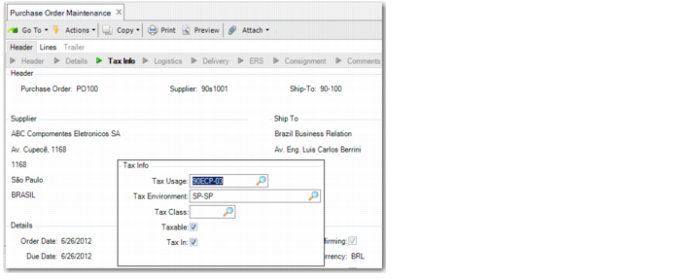
In this example, the tax usage 90ECP-03 is associated with the Purchase operation in Tax Usage Maintenance, and tax usage 90EDV-01 is associated with the Sales Return operation in Tax Usage Maintenance.
When creating a purchase order in Purchase Order Maintenance (5.7), you specify 90ECP-03 as the tax usage. When you click Next, you can proceed with creating the purchase order because you have specified the correct tax usage for the type of operation.
Purchase Order Maintenance, Tax Usage Frame
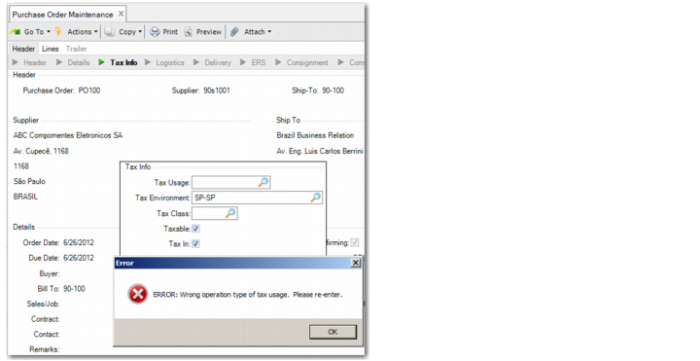
When creating another order in Purchase Order Maintenance, you specify tax usage 90EDV-01, which is associated with the Sales Return operation in Tax Usage Maintenance.
Purchase Order Maintenance, Tax Usage Frame
When you click Next to move from the Tax Info frame in Purchase Order Maintenance, the system displays an error message because you have specified an incorrect tax usage.
Purchase Order Maintenance, Wrong Tax Usage Error
You cannot proceed with creating the purchase order until you enter a valid tax usage.