QAD Internationalization Extensions, Brazil 4.0
>
User Guide
>
Inovar Auto
>
Inovar Auto Calculation
Inovar Auto Calculation
The control file Inovar Auto Search Criteria enables you to perform the deductible portion calculation and create an XML file containing the result, along with other relevant information.
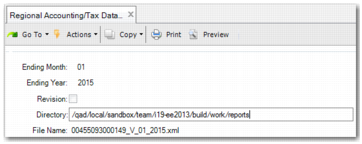
After selecting the control file, on the first screen, you enter the ending month and ending year. Specify whether the file is a revision of an existing file or a new file. Specify the directory where the xml file is stored and the file name. The file name is made up of the 14-character federal tax ID followed by the version month and year.
Inovar Auto - Calculation Step
An XML file is generated in the correct layout in the specified directory. It contains the value of the deductible portion and other government required details. The following is an example of an XML file:
<?xml version="1.0"?>
<tns:AutoDeclaracao
xmlns:tns="http://www.tarea.com.br/InovarAuto/AutoDeclaracao"
xmlns:xsi="http://www.w3.org/2001/XMLSchema-instance"
xsi:schemaLocation="http://www.tarea.com.br/InovarAuto/AutoDeclaracao AutoDeclaracaoCompraVenda.xsd">
<tns:retificadora></tns:retificadora>
<tns:tipo_declarante></tns:tipo_declarante>
<tns:razao_social></tns:razao_social>
<tns:cnpj></tns:cnpj>
<tns:matriz></tns:matriz>
<tns:operacao>
<tns:natureza_operacao></tns:natureza_operacao>
<tns:empresa>
<tns:razao_social></tns:razao_social>
<tns:cnpj></tns:cnpj>
</tns:empresa>
<tns:mes_ref></tns:mes_ref>
<tns:ano_ref></tns:ano_ref>
<tns:vl_total_notas></tns:vl_total_notas>
<tns:vl_parc_dedutivel></tns:vl_parc_dedutivel>
</tns:operacao>
<tns:operacao>
<tns:natureza_operacao></tns:natureza_operacao>
<tns:empresa>
<tns:razao_social></tns:razao_social>
<tns:cnpj></tns:cnpj>
</tns:empresa>
<tns:mes_ref></tns:mes_ref>
<tns:ano_ref></tns:ano_ref>
<tns:vl_total_notas></tns:vl_total_notas>
<tns:vl_parc_dedutivel></tns:vl_parc_dedutivel>
</tns:operacao>
</tns:AutoDeclaracao>
The system also generates a text error file at the same time as the XML file. The text file contains a list of items for which it was not possible to calculate the deductible portion.
Inovar Auto Reconciliation Reports
You can generate different reports to enable you to verify the deductible portion calculated for the XML file.
Purchase Reconciliation Report
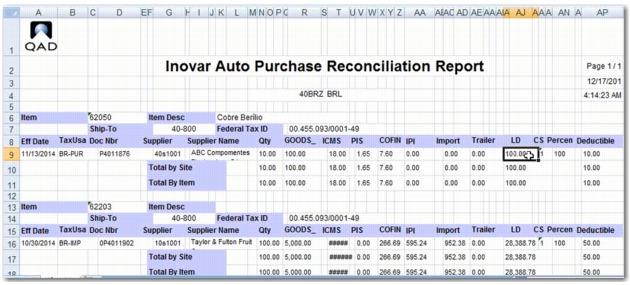
Purchase Reconciliation Report (7.10.7.23.1) enables the system to retrieve information on purchased items by legal document line. Each line is used to calculate the deductible portion.
Based on the specified search criteria, the system looks for all relevant purchases and finds the legal documents containing these purchases. The search criteria are month, year, and item number. The total deduction in the report should match the value in the XML file.
Purchase Reconciliation Report displays the report in Excel layout. You can also run the report in application layout.
Purchase Reconciliation Report
Sales Reconciliation Report
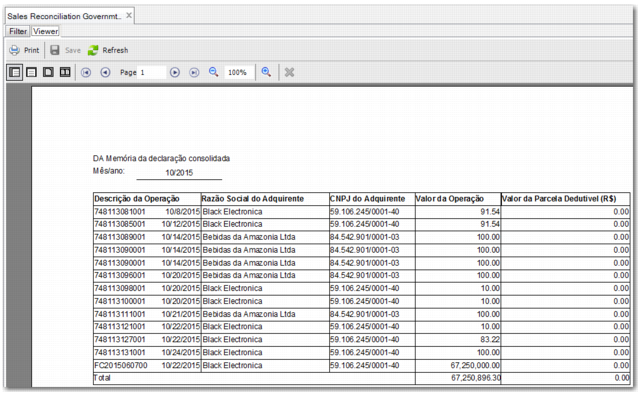
Similarly, run Sales Reconciliation Report (7.10.7.23.2) to verify whether the calculated deductible portion of the specified sales legal documents is equal to the amount consolidated in the XML file.
Sales Reconciliation Report - Government Layout
You can also run the report in the government layout, using the search criteria Month, Year, and Item. The columns show the transaction summary, the ship-to name and federal tax ID, the legal document amount, and the deductible portion.
Sales Reconciliation Report - Government Layout
Upload BOM for EAM Items
Upload BOM for EAM Items (7.10.7.23.3) enables you to automatically set up product structures for EAM items input into the system using work orders. These are automotive items that do not already have a product structure set up in the system.
Purchase Transactions per Parent Item
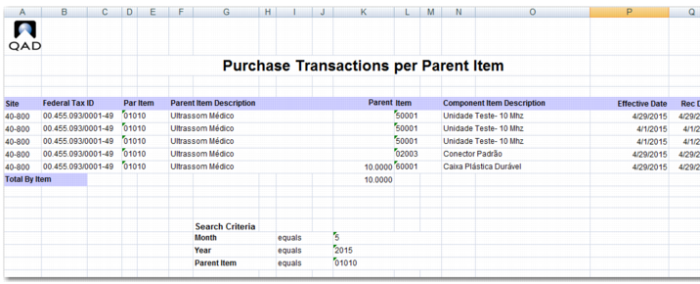
Purchase Transactions per Parent Item (7.10.7.23.4) is a mandatory report that outputs parent items without components.
Based on the specified search criteria, the system looks for all relevant purchases of parent items and finds the legal documents containing these purchases. The search criteria are month, year, and parent item. The report calculates and displays the deductible portion. This report is available in Excel format.
Purchase Transactions per Parent Item Report
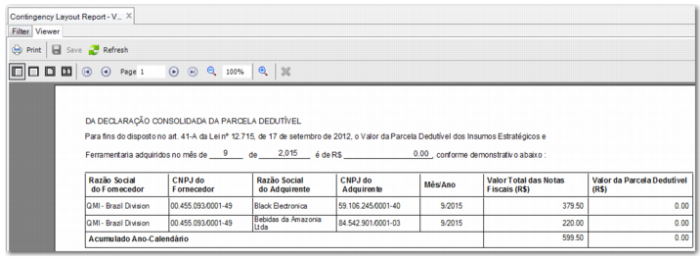
Contingency Layout Report
The Inovar Government Contingency Report is a formatted readable report that displays the data produced for the Inovar XML file. The layout is displayed in
Contingency Layout Report.
Contingency Layout Report
The columns contain the ship-from name and federal tax ID, the ship-to name and federal tax ID, the year and month, the legal document total amount for the period, and the deductible portion amount.