QAD Solution
QAD has developed the Germany ELSTER VAT Declaration Report to meet this requirement.
Based on tax box and tax group settings, this solution creates an XML file for upload to the ELSTER platform.
Prerequisites
Setting up Tax Information
Ensure that all tax setup for your entity and any related entities is complete, including tax box, tax class, and tax group setup. For more information on tax setup, see QAD Global Tax Management User Guide.
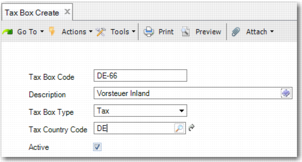
When setting up a tax box, the Tax Box Type field must be the same as the type of the ELSTER identifier or Kz code.
Tax Box Create
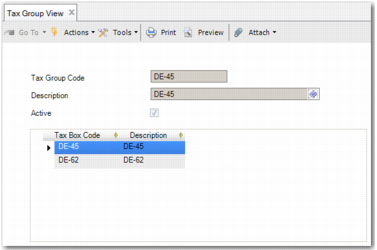
Tax groups can contain multiple base type tax boxes and one VAT or tax type tax box.
Tax Group View
Specifying the VAT Number of the Entity
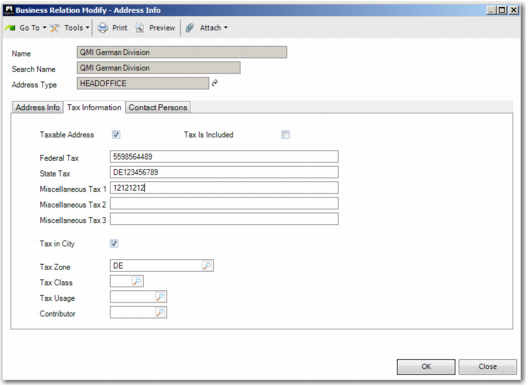
Specify the tax number (Steuernummer) of the entity in the Miscellaneous Tax 1 field of the HEADOFFICE address in the entity business relation.
Business Relation HEADOFFICE Address with Entity Tax Number
Setting up Generalized Codes for the Declaration
Use Generalized Codes Maintenance to specify information for the declaration:
• XML tag content
• Output directory and file name information
• Formatting of some negative monetary values to positive values
Generalized Codes for ELSTER VAT Declaration XML Tags
Field Name | Value | Comment |
QAD_I19_DE_ELSTER_CONF_DATA | OutputDirectory | Specify the full directory path in which you want to save the XML declaration file. |
QAD_I19_DE_ELSTER_CONF_DATA | XmlFileNamePrefix | Specify the prefix for the XML file name. The format of the file name is [Berichtigung-]<PREFIX>-<yyyyMMdd_hhmmss>.xml, where <PREFIX> is the XmlFileNamePrefix that you specify in this generalized code. |
QAD_I19_DE_ELSTER_CONF_DATA | HerstellerId | Specify the manufacturer ID. This value appears in the HersellerId XML tag of the XML output. |
QAD_I19_DE_ELSTER_CONF_DATA | Testmerker | Specify the deployment code; 000000000 represents TEST, and 700000004 represents LIVE. For a full list of deployment codes, consult ELSTER documentation. This value appears in the Testmerker XML tag of the XML output. |
QAD_I19_DE_ELSTER_CONF_DATA | EmpfaengerId | Specify the type of German tax authority receiving the declaration. For possible values, consult ELSTER documentation. This value appears in the ID attribute of the Empfaenger XML tag in the XML output. |
QAD_I19_DE_ELSTER_CONF_DATA | EmpfaengerNummer | Specify the German tax authority number. This value appears in the Empfaenger XML tag of the XML output. |
QAD_I19_DE_ELSTER_CONF_DATA | REVERSE_SIGN_OF | Specify a comma-separated list of tax box codes to include in the declaration. The sign of the related monetary values is reversed before the values are exported to XML. |
QAD_I19_DE_ELSTER_CONF_DATA | REVERSE_SIGN_OF<My Additional Identifier> | This value has the same purpose as REVERSE_SIGN_OF; when the full comma-separated list of values is too large to fit in REVERSE_SIGN_OF, use this value for additional storage. Example: Generalized code REVERSE_SIGN_OF-1 with comment DE-52, DE-53, where -1 is the <My Additional Identifier> value that you specified in the generalized code. |
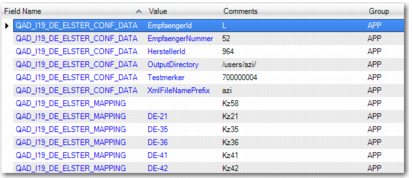
QAD_I19_DE_ELSTER_MAPPING | <QAD Tax Box Code> | For each tax box that you want to export in the XML file, specify the kz identifier that you want to map the tax box code to. Tax box codes are listed in Tax Box View (29.6.1.1.3). |
Example of Generalized Codes for the ELSTER VAT Declaration
Report Access
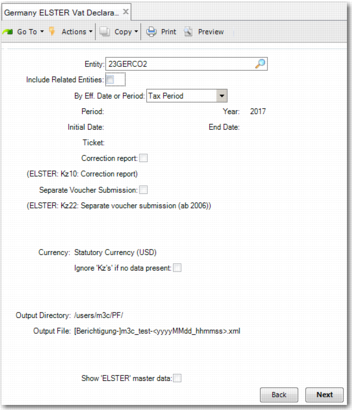
Access Germany ELSTER Vat Declaration Report (36.5.8.12.3).
VAT Declaration for ELSTER, Selection Criteria
Entity
Specify the entity for which to make the declaration.
Include Related Entities
To include entities in the same corporate group and with the same main domain as the entity specified in the Entity field, select this field. For more information on relating entities to one another, see
Including Entities in a Group.
By Eff. Date or Period
Use the drop-down menu to specify whether the declaration is based on a tax period or GL period, or on a tax date or GL effective date range.
Period, Year
Specify the period and year for the declaration. This field only applies when you select Tax Period or GL Period from the By Eff. Date or Period drop-down menu.
Initial Date, End Date
Specify the initial date and end date for the declaration. This field only applies when you select Tax Date or GL Effective Date from the By Eff. Date or Period drop-down menu.
Ticket
Specify a unique name for the declaration.
Correction report
If you are creating a declaration with corrections, which replaces an earlier declaration, then select this field.
Note: When you select the Correction report field, in the Ticket field, specify the same value that you specified for the original declaration — the declaration that you want to correct.
Separate Voucher Submission
If you are submitting documents — invoices, contracts, or other documents — to the government with this declaration, then select this field.
Currency
Specify the currency in which you want to make the declaration.
Ignore 'Kz's' if no data present
If you want tax boxes with no information to be excluded from the declaration, then select this field.
Output Directory
This field is read only, and displays the folder in which the declaration is saved. You can specify this value in Generalized Codes Maintenance. For more information, see
Setting up Generalized Codes for the Declaration.
Output File
This field is read only, and displays the name of the file in which the declaration is saved. You can specify this value in Generalized Codes Maintenance. For more information, see
Setting up Generalized Codes for the Declaration.
Show ELSTER master data
If you select this field, then the PRN output file includes help information about each kz.
Report Output
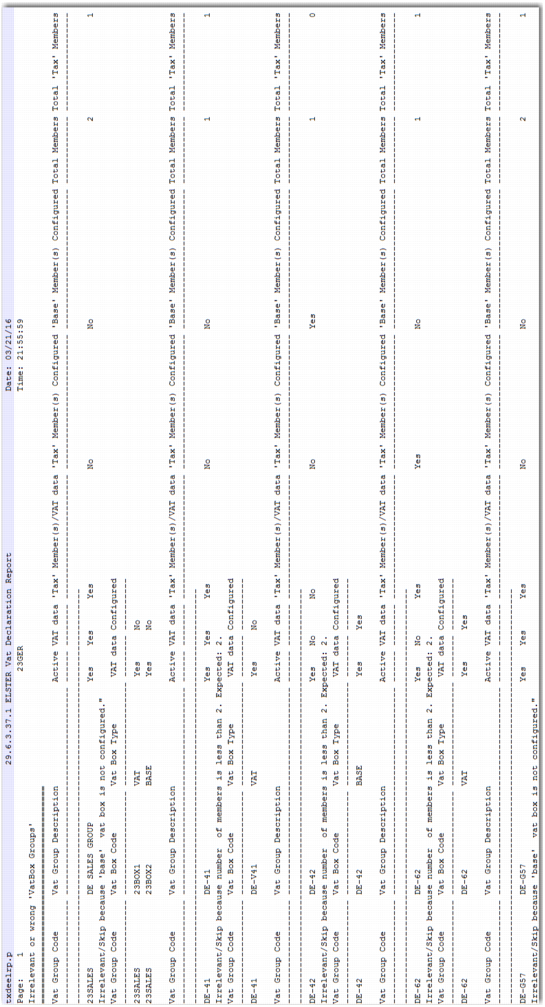
When the report runs, any errors in the tax environment setup are listed in the report output, along with any warnings in a PRN file.
Germany ELSTER VAT Declaration Result, PRN File
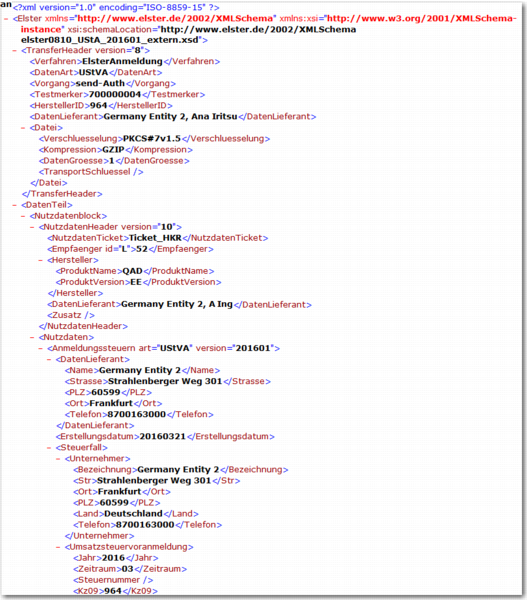
If there are no errors or warnings, then the XML output file is created.
Germany ELSTER VAT Declaration Result, XML File