Using View Maintenance
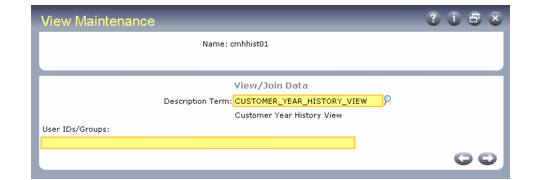
View Maintenance (36.20.18) illustrates View Maintenance (36.20.18).
View Maintenance (36.20.18)
1 Select or enter a view name.
2 Enter a label term in Description Term. The long label contained in this term is displayed as the view label.
3 In User IDs/Groups, enter a user ID to limit user access to the view (optional). You can enter multiple user IDs by separating them with commas.
4 Press Go.
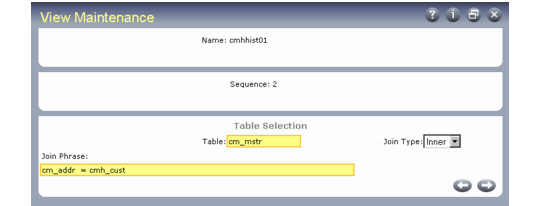
View Maintenance, Table Selection
5 The number you enter in Sequence controls the order in which the table defined in Table is joined to the view.
6 Enter a table name.
7 If the sequence is not 1, specify the type of join, either inner or outer. The Join Type field is only enabled when the sequence number is greater than 1.
8 Enter or edit the phrase to join the tables. Use proper Progress syntax. Do not include a Where verb. Join phrases express the field relationships between tables (see
Creating a View by Joining Two Tables). For a faster display of fields, use indexed fields in the Join Phrase.
9 Press End.
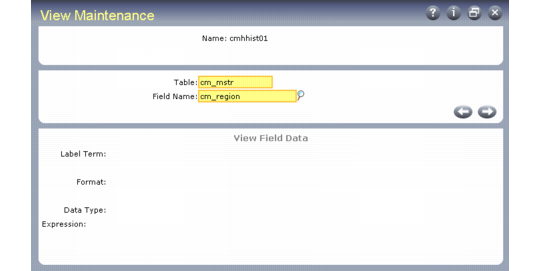
View Maintenance, View Field Data
10 In Field Name, enter a field from one of the tables in the view or enter a local variable. When entering a local variable, name it local‑varnn, where nn is a number incremented by one from the last defined variable.
For example, you see from the look-up browse that the last local variable was local-var05; you name your local variable local‑var06. Use local variables when you want to return a value resulting from an operation on two fields; for example, the quantity required minus the quantity open. Define the operation in Expression.
11 If you entered a local variable in Field Name, enter its Label Term, Format, and Data Type.
Note: Search for a label term by entering a portion of a label, then use Next/Previous to display available records.
12 If Field Name is a local variable, you can enter Progress syntax in Expression to define the local variable. Valid expressions include:
• field1 + field2 (computation, where field1 and field2 are fields within the record)
• >, <, >= (operands that perform comparisons)
• Progress functions, such as substring (field1,1,4) or round (field1,1)
Note: Incorrect syntax terminates your session if you attempt to use the view.