Converting Master Records
Once you finish implementing VAT processing in GTM, the next activity is to update tax settings in the following master records:
|
• Suppliers
|
• Trailer codes
|
|
• Customers
|
• Service categories
|
|
• Product lines
|
• Service agreement terms
|
|
• Items
|
|
GTM has additional fields and may require new values for existing fields.
VAT to GTM–Masters
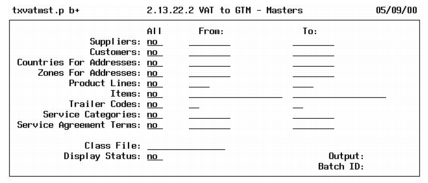
To convert master records, run VAT to GTM–Masters (2.13.22.2).
VAT to GTM– Masters (2.13.22.2)
In addition to updating the tax settings in the master records, this program assigns tax zone codes to supplier, customer, and company address records. For verification of changes, the program generates an audit trail.
For each type of record, you can convert all records, a range of records, or individual records. The program converts records in the same order as the options on the screen. For separate audit trails, run the report separately for each type of record.
If you created a class file during the setup step, specify its name in the Class File field. Display status, output, and Batch ID are the same as in the setup program.
Master Conversion Audit Trail
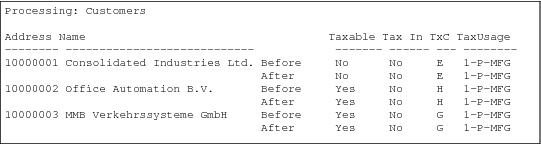
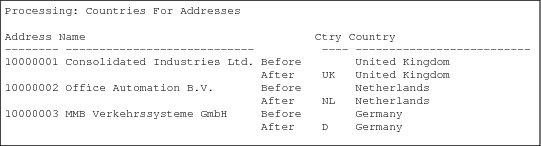
The master conversion prints a report of changed records. The format varies depending on the records included in the conversion. For each group of converted records, the report shows the record number and name followed by the before and after tax information, such as country code, tax zone code, taxable status, whether tax is included in item amounts, tax class, and tax usage.
Groups of converted records are printed in the same order as the screen selection criteria, and each group is separated by a page break. Warning and error messages identify potential conversion problems.
If you specified a class file, the report prints the VAT class and the corresponding GTM tax class and tax usage if any.
Customer Audit Trail
Countries for Addresses Audit Trail
Troubleshooting the Master Conversion
The error messages in the audit trail identify conditions you should analyze and address before converting transactions.
Troubleshooting the Master Conversion lists some common problems along with explanations. Before you make corrections, restore the database from backup.
Warning Do not proceed to the transaction conversion until the master conversion audit trail is free of errors.
Troubleshooting the Master Conversion
Error | Explanation |
Tax class cannot be converted. | Class file does not contain VAT class that matches the one in the master record. |
Blank tax class not allowed. | VAT class is blank in the class file. |
Tax class cannot exceed 3 characters (xxx). | VAT class in the class file is longer than three characters. Message shows the first three characters. |
Tax class does not exist (x). | VAT class in the class file not in the VAT master. |
Tax class is not unique (x). | VAT class occurs in multiple places in the class file. |
Tax class does not exist (xxx). | GTM tax class in the class file does not exist in the GTM tax class master. |
Tax usage cannot exceed 8 characters (xxxxxxxx). | GTM tax usage in the class file is longer than eight characters. Message shows the first eight characters. |
Tax usage does not exist (xxxxxxxx). | GTM tax usage in the class file does not exist in the GTM tax usage master. |
Tax class/tax usage combination is not unique (xxx xxxxxxxx). | GTM tax class and tax usage combination occurs in multiple places in the class file. |
Note: x, xxx, and xxxxxxxx are placeholders for the actual codes displayed in the error message.
How the Conversion Changes Master Records
The following is provided to assist developers and others who require technical information on how the master conversion updates the database.
The menu-level program for VAT to GTM–Masters is txvatmst.p. This program calls subprograms that set the GTM tax values in the individual database tables. These programs can set the existing VAT class value or retrieve an alternate value from a class file.
Changes to Master Records lists the affected database tables and summarizes the changes.
Changes to Master Records
Table | Summary of Changes |
ad_mstr | In supplier records, txvatvd.p sets ad_taxable from vd_taxable. It also sets ad_taxc and ad_tax_usage from ad_taxc or from the class file with AP usage if any. In customer records, txvatcm.p sets ad_taxable from cm_taxable and ad_tax_in from cm_tax_in. It also sets cm_taxc, ad_taxc, and ad_tax_usage from cm_taxc and from the class file with AR tax usage if any. In all address records, txvatct.p sets ad_ctry from ad_country and vice versa. txvatzn.p calls txtxzget.p to set ad_tax_zone. |
fsc_mstr | txvatfsc.p sets fsc_taxc from fsc_taxc or from the AR tax usage if any. |
pl_mstr | txvatpl.p sets pl_taxc from pl_taxc or from the class file if any. |
pt_mstr | txvatpt.p sets pt_taxc from pt_taxc or from the class file if any. |
sv_mstr | txvatsv.p sets sv_taxc from sv_taxc or from the class file with AR tax usage if any. |
trl_mstr | txvattrl.p sets trl_taxc from trl_taxc or from the class file if any. |