Resolving Conversion Errors
This chapter contains reference information to help you resolve some common conversion issues.
Duplicate Record Errors
During data loads, MFG/UTIL sets the acceptable error percentage in the Progress data load utility to 100. When an error occurs, an error file (extension .e) is generated with the same name as the data file where the error occurred. The error file is stored in the directory from which the data is being loaded. After the error is recorded, the load continues with the next data file. This load method lets you complete a load and then resolve errors in specific data files.
Because a data file can contain multiple records, it can be difficult to locate the exact record that caused the load error. You can use the Progress Reconstruct Bad Load Records utility to isolate the records in a data file that are causing errors.
Solution
Use the following instructions to:
• Run the Reconstruct Bad Load Records utility and identify the individual records that are creating errors.
• For each record identified, modify the record itself or the database table into which it will be loaded.
• Load the records into the database.
These steps use the variables in
Duplicate Record Variables.
Duplicate Record Variables
|
If you see...
|
It refers to...
|
|
SchemaHolder
|
The target version schema holder
|
|
$DLC
|
The directory where the Progress software is installed
|
1 Use the following command to launch the Progress Data Dictionary and connect to your target version schema holder:
$DLC/bin/pro SchemaHolder -p dict.p
2 From the Data Dictionary, select the Admin menu. Then select Load Data and Definitions and choose Reconstruct Bad Load Records.
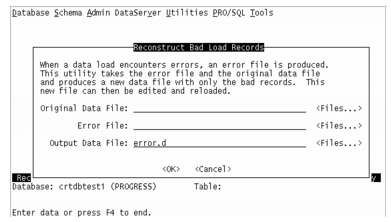
3 For each of the data files where errors occurred, use the following graphic and table to complete Reconstruct Bad Load Records.
Field | Enter |
Original Data File | The path and name of the data file in which the error occurred; for example, mnt_det.d. |
Error File | The path and name of the corresponding error file; for example, mnt_det.e. |
Output Data File | A directory location and name for the Reconstruct Bad Load Records utility’s output file. This file contains only those records from the original data file that caused errors; for example, error.d. |
4 For each record in error.d, you must determine if the record is a duplicate or if it needs to be added to the database table.
• If the record is a duplicate of a record already in the database table, remove the record from error.d.
• If the record needs to be added to the table, you must change the values in the fields that make up the unique index so that they are in fact unique. You can change the records in error.d using an editor or the rows in the table using assign (4GL) statements. You must determine for each record which approach is correct for your circumstance—changing the table’s contents or changing the file.
5 Once all the duplicates have been resolved by making their key values unique or by removing them from error.d, use the Progress Data Dictionary to load error.d into the appropriate database.
6 Repeat steps
2 through
5 for each
.e file created during the data load process.