|
Business Process Steps
|
Corresponding Tasks
|
|
Receive order from an ERP system.
|
Outside of workflow
|
|
Create a manual shipment within workflow to fulfill this order.
|
Outside of workflow
|
|
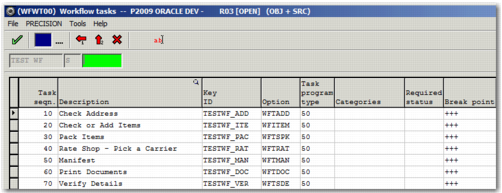
Verify ship to address.
|
WFTADD
|
|
Add items to the shipment, or check items in the shipment.
|
WFITEM
|
|
Pack items.
|
WFTSPK
|
|
Rate the shipment.
|
WFTRAT
|
|
Complete the shipment manifest.
|
WFTMAN
|
|
Print documents related to the shipment.
|
WFTDOC
|
|
Verify all details related to the shipment by viewing the shipment details.
|
WFTSDE
|