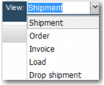
View List
The View list allows users to determine the type of transaction they want to view in the workflow by selecting the transaction type from a drop-down menu.
Configuring the View List
The TAB ORDER system value determines the contents of the View list. Enter a comma-separated list of letters in TAB ORDER. Each letter represents a type of transaction; for example, S is for shipments, and O is for orders. The order of the letters determines the order of the items in the list. The menu in
View List is the result of setting the system value to S,O,I,L,D.
View List
You can configure TAB ORDER so that users can view shipments, orders, invoices, loads, consolidations, or any other transaction type. Depending on the type of user, you can restrict them to viewing one type of transactions only. For a full list of transaction types, go to the Z9 option in the Windows UI.
Note: Transaction types are created during initial system setup.