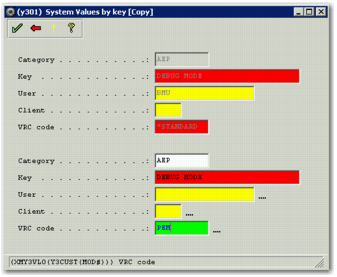
System Value Environments
You can specify the environment in which system values apply. You might want to do this if you are running the PRECISION solution on more than one server.
For example, one server runs desktop shipping internally. A second server runs PEM, which is exposed over the Internet. To protect against unauthorized access, you decide to turn on permissions for the PEM server using the ENABLE PERMISSIONS system value, leaving permissions switched off on the desktop shipping server.
To do this, create a separate instance of the ENABLE PERMISSIONS system value for each server or environment. By default, there is one standard environment. To allow you to reference other environments, make a change to the precision.properties file. Change the line:
precision.login.environments=*STANDARD
to:
precision.login.environments=PEM,*STANDARD
The precision.properties line now specifies that system values with a VRC code of PEM take precedence over permissions with a VRC code of STANDARD.
Important: If you are adding the precision.login.environments line to the precision.properties file rather than changing it, you can add it at any point in the file. However, make sure there is only one entry, because if there are multiple entries, the final one takes precedence.
For the change you have made to the
precision.properties file to take effect, you must restart the JBOSS virtual machine. You must also create two instances of the ENABLE PERMISSIONS system value. Specify the environment to which the system value applies using the VRC code, as in
VRC Code.
VRC Code
You can now modify the two instances of the same system value using the System Value Setup page.