Highway
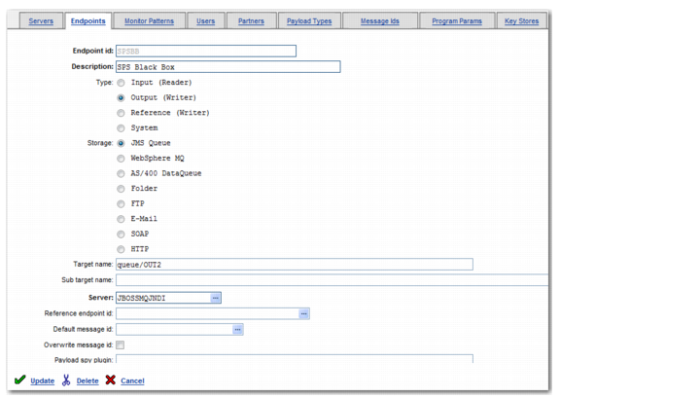
When you are using clustering, you define JMS endpoints in Highway slightly differently. To do this, log in to the Highway console and click System Definition|Endpoints. For each JMS endpoint, you need to change the contents of two fields, as displayed in
Highway Endpoint Settings.
• Change the entry in the Target name field from OUT2 to queue/OUT2. This defines a standard way for endpoints to connect to the JMS queues.
• Change the entry in the Server field from JBOSSMQ to JBOSSMQJDNI. This specifies that the endpoint should connect to the server through a JNDI lookup.
Highway Endpoint Settings
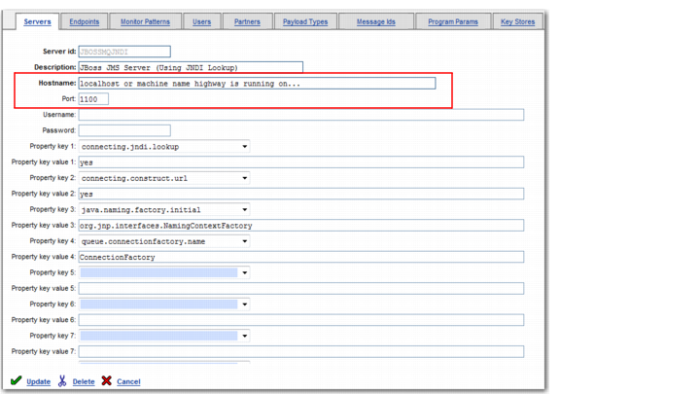
Next, select the Servers tab and locate the server JBOSSMQJDNI.
• Set the entry in the Hostname field to localhost. If localhost is not allowed, set the entry to the name of the server Highway is running on.
• Set the entry in the Port field to the high-availability port, which is 1100 by default.
Highway Server Settings
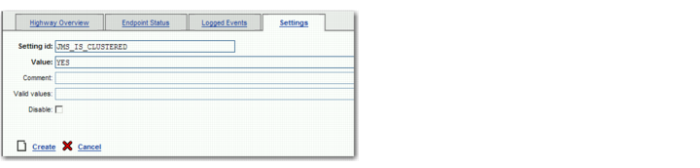
You also need to indicate to Highway that clustering is enabled. It does not affect how clustering works, but it does impact on the ability of Highway to monitor listeners. For example, Highway on SERVER1 tests a listener. The listener responds as expected but Highway on SERVER2 picks up the response. However, because SERVER1 receives no response, it flags a listener problem. To avoid this, you must inform Highway that clustering is enabled. In the Highway console, click Home and select the Settings tab. Locate the Setting id JMS _IS_CLUSTERED. If you cannot find it, create a new entry for it and set the parameter to YES.
Highway JMS Clustering