Clustering
This section describes how to set up a PRECISION clustered environment.
OverviewProvides an overview of how clustering works in PRECISION.
InstallDescribes how to enable clustering on installation.
Load BalancerDescribes the role of the load balancer in failover.
JBossDescribes how to set up JBoss to enable clustering.
HighwayDescribes how to set up Highway to work with clustering.
ListenersDescribes how to set up listeners to contact each JBoss node.
Overview
Clustering is used by many organizations. It enables a system to scale and grow with business demand. It is also a way to introduce failover, which is important in continuous high-volume production environments. In PRECISION, JBoss clustering enables you to configure a system with two or more JBoss servers that process SOA XML messages. It is also possible to use clustering for the Web UI. However, it is generally better practice to set up each Web server as a self-contained independent server.
A cluster is a set of nodes that behave as one. In a JBoss cluster, a node is a JBoss server instance. To build a cluster, several JBoss server instances must be grouped together. This is known as a partition. You can have different clusters on the same network. However, each cluster must have a unique partition name.
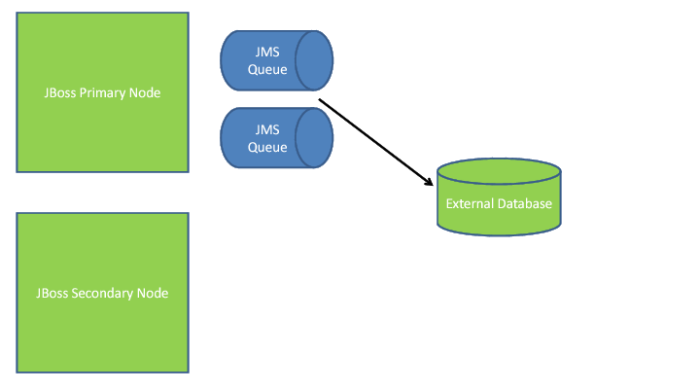
The key benefit of a JBoss cluster to the PRECISION solution is that it shares one set of JMS queues between all the servers in the cluster. In the example in Figure 13.1, the primary node is the server that starts up first and launches the JMS Queues. It also stores messages in an external database until the messages have been processed.
JBoss Two Server Cluster
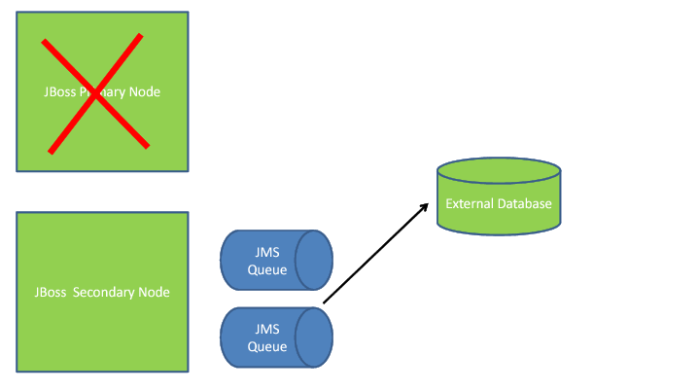
The secondary node connects to the primary node. It is able to send messages to and consume messages from the JMS queues on the primary node. If the primary node goes down, failover kicks in and the secondary node starts up its JMS queues. The secondary node also ensures that any unconsumed messages saved by the primary node to the database are not lost, as displayed in
JBoss Two Server Failover.
JBoss Two Server Failover
Clustered Environments
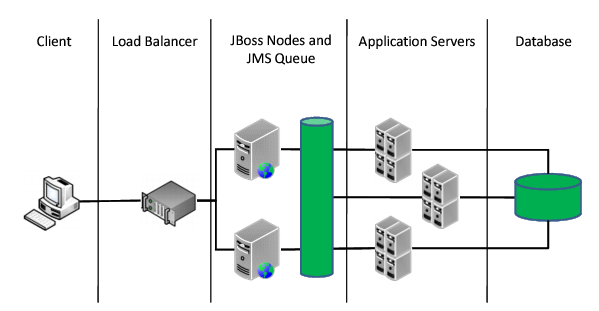
External systems (ERP or WMS solutions) act as a client and send XML messages to PRECISION. Organizations should make sure that the processing of these messages is not compromised. A clustered environment helps with this objective because it allows the external system to post messages to either server. If one server becomes unavailable, the messages can still be sent to the other server. The directing of messages to either PRECISION server should be abstracted away from the client. You can do this by using a load balancer. The load balancer presents the client with a single URL to post to. The load balancer then passes on the message requests it receives to the primary or the secondary node.
In a clustered environment, the two servers share one set of JMS queues. In this way, the clustered JMS queue is a load balancer in itself because it shares the messages across all listeners. Therefore, it is not that important which server the load balancer posts to. However, it is important that the load balancer detects when a server is down.
Note: A clustered environment is more challenging to set up than a cloned environment. However, it is also more efficient. When a server fails in a cloned environment, all its messages are lost and need to be resubmitted. The listeners assigned to the failed server may now do nothing, but the ones assigned to the remaining server are very busy. This will not happen in a clustered environment because queues are shared by the servers.
The primary node opens up ports that allow other processes to talk to the queue, and it enables messages to be kept in memory in an external database. The secondary node passes messages posted to it by the load balancer up to the primary. The listeners pick up these messages and they are then consumed by the application servers and functionality is executed.
When a client posts to Highway, Highway connects to the JMS queue using the high-availability port. Typically, this means that the client can connect to either server without distinguishing between the primary and the secondary nodes. By default, the high-availability port is 1100. In certain cases where throughput it very high and processing times must be kept very low, a small performance gain is possible by posting to Highway running on the primary JBoss node.
Note: Port 1099 is the standard port used when trying to connect to the JMS queues. However, this port only allows a connection to the primary node. This is used when configuring listeners.
Scalability and High Availability