Create an Endpoint
You need to create an endpoint to use the server record. To access the Highway menu, select Highway Console from the System Settings menu option in the left menu.
To view the list of existing endpoints, click Endpoints in the System Definition menu at the top of the screen. To create an endpoint record, click New.
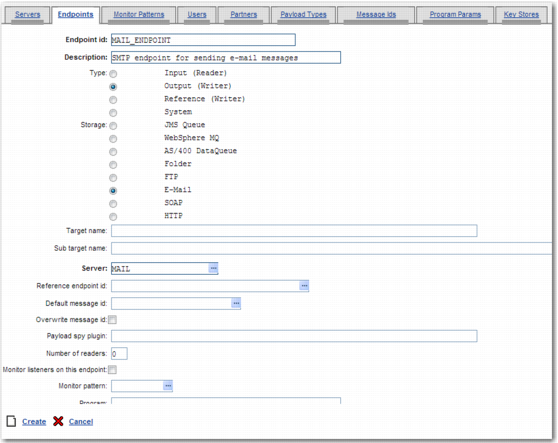
Create Endpoint Record Page
You must fill in a number of fields on this screen:
Endpoint id
Specify a unique title to identify the endpoint.
Description
Enter a description of the endpoint.
Type
The type of endpoint. In this case, it is an output endpoint.
Storage
The type of storage associated with the endpoint. In this case, the storage type is E-Mail.
Server
Enter the ID of the mail server record that you created as described in
Create a Mail Server Record.
Number of readers
Set to zero.
Program parameter hint
Set to DEFAULT.
To create the endpoint record, click Create.
Note: Your installation may already include a mail server and endpoint. In this case, you can update these existing records instead of creating new ones.