Commodity-Level License Rules
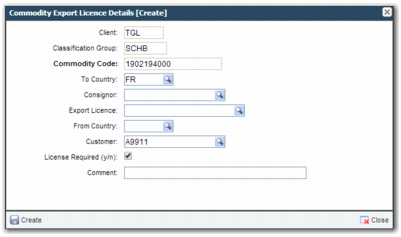
To set up a license at commodity level:
1 Open option CM.
2 From the commodity classification group list, select the commodity that you want to classify.
3 In the sub-options, select Commodity Export License details.
4 Create a new record.
To Country
The license is required when shipping to the country in this field.
Consignor
The license is required when the consignor is the one specified in this field.
Export License
Add a valid export license here that enables the transaction to automatically pass the check. You must set up the license in option XG before you can use it here.
From Country
A license is required when shipping from the country in this field.
Customer
A license is required for shipping to the customer in this field.
License Required
Select this field to require a license. It is selected by default. Clear this field when this rule is an exception that specifies a commodity where no license is required.
Create Commodity Export License
6 To add the record, click Create.
For the EXLI check, it is possible to set up different combinations of product and commodity rules. For each combination, the precedence is displayed in
Precedence in EXLI Check Combinations.
Precedence in EXLI Check Combinations
Combination and Order of Precedence |
Customer, Consignor, Country, Item Country |
Customer, Consignor, Country |
Customer, Consignor, Item Country |
Customer, Consignor |
Customer, Country, Item Country |
Customer, Country |
Customer, Item Country |
Customer |
Consignor, Country, Item Country |
Consignor, Country |
Consignor, Item Country |
Consignor |
Country, Item Country |
Country |
Item Country |
All blank |
When more than one entry is found for a matching combination, the following hierarchy applies:
• Use the entry that has an export license assigned.
• When more than one entry has an export license assigned, use the first one in alphabetical sequence.
Export Control License System Value lists relevant system values that you can configure for the EXLI check.
Export Control License System Value
Category | Key | Value |
COMPLIANCE | EXLI – TRANSACTION TYPE UPDATE | This value is a comma-separated list of transaction types from the Z9 option; for example, O for order, S for shipment, Q for quote. For the transaction types listed here, the number used on the license is not incremented. Generally, this list contains transaction types where a compliance request for a customer order is sent from third-party software. Therefore, the third-party software likely increments the number used for the license. |