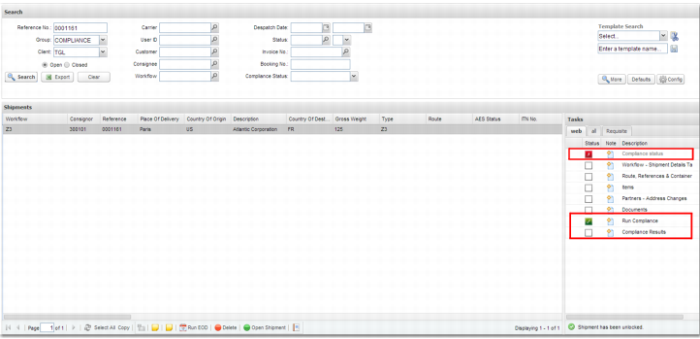
Tasks Area
When you select a transaction in the Transaction panel, any compliance tasks associated with the workflow are displayed in the Tasks Area.
Web UI Compliance Tasks contains the compliance checking tasks that can be run in the Web UI. Depending on how your system is set up, these tasks may be named differently.
Web UI Compliance Tasks
|
Name
|
Description
|
|
Compliance Results
|
This task opens the Compliance Results screen for the transaction.
|
|
Compliance Status
|
The status of this task is the current compliance status of the transaction.
|
|
Run Compliance
|
Enables you to run compliance on the current transaction.
|
Workflow Transaction with Compliance Tasks
Run Compliance
When you click the Run Compliance task, compliance runs on the current transaction. There is no screen associated with this task.
Compliance Status
The Compliance Status task is displayed for information purposes and does not allow user interaction. The task status is updated automatically when the overall compliance status of a transaction changes. The task icon displays a red x when compliance fails and a green check mark when it passes. Your administrator may configure other workflow tasks not to run until compliance has passed by setting the Compliance Status as a prerequisite task.
Compliance Results
This task provides access to the compliance results screen for the transaction. For further information, see
Compliance Results.