Dual Use Check
The Dual Use check determines whether an item can be shipped to or requires an export license to be shipped to a specific country. The determination is based on the classification of a product; the Export Control Classification Number (ECCN) in the US or dual-use code in the EU. This supports the Export Administration Regulations (EAR) in the US and the dual use regulation 428/2009 in the European Union.
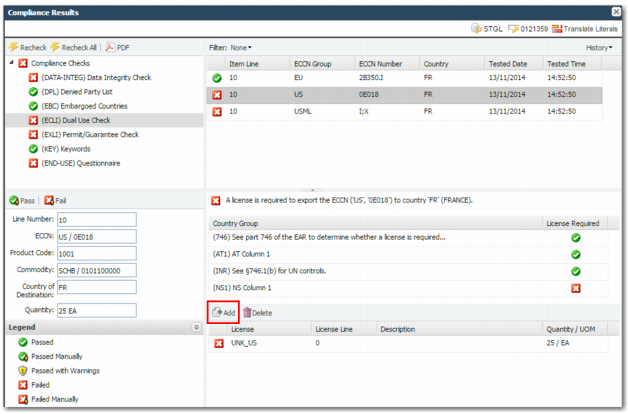
The Dual Use check ensures that valid ECCN or dual-use codes are present when required. When a product is associated with an ECCN or dual-use code and this code is required when shipping to a particular country, the check fails when a valid code is not present or when it is controlled for the country of destination on the transaction. In the example in
Dual Use Check, the check fails because an ECCN code is required for this item line but the code is not present.
In
Dual Use Check, there is only one item line on this transaction. Where there are multiple lines, click each line for more information. The lower right pane contains details of the results of the compliance check. The left pane contains item line details.
Note: This check is based on the content provided by Precision. Currently, EU dual-use and US ECCN content are supported.
Dual Use Check
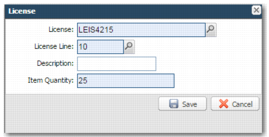
When the check fails and you have the necessary permissions, you can add a license to the transaction. To display the License screen, click Add.
Compliance Results - Add License
License
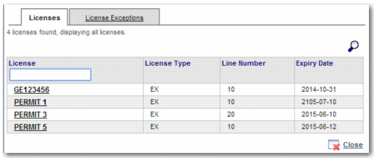
Enter a license or select one using the lookup. You can only select from the licenses that are already set up in the system by the administrator. This field is mandatory. The lookup displays a list of licenses, as displayed in
Compliance Results - Add License.
Compliance Results - Add License
License Line
When you choose a valid license, the system chooses the first permit line applicable to the transaction. This field is mandatory.
Description
The description defaults from the license description in option XL. You can override this description.
Item Quantity
Enter the quantity of the item that the permit is required for. When the quantity on the item line exceeds the quantity left on the license, an error message is returned. For each line to pass compliance, the quantity on the transaction line must be covered by the assigned licenses. This field defaults to the quantity on the transaction line not already covered by a license. The system validates that the quantity and value available on the license line are not exceeded.
Prerequisites for Successfully Attaching a License
• The transaction must occur within the date range covered by the license.
• You cannot use a license to ship an item line when the product value or amount on the license does not cover the amount or value on the item line.
• If you have a license set up for a particular commodity code or product, you cannot use it for any other commodity code or product.
If you have a license set up for a particular intermediate or ultimate consignee, you cannot assign the license to a different consignee.