Permit/Guarantee Check
There can be a requirement when shipping certain goods to have a Permit or Guarantee in place to export or import. The check can specify that a Permit or Guarantee is required based on the following criteria:
• Product
• Commodity
• Country of Destination
• Country of Origin
• Customer
• Consignor
The check reviews each line on the transaction and when—based on the criteria—it determines that a Permit or Guarantee is required, compliance fails for that line. All lines must pass this check for the overall compliance status of this check to pass.
EXLI Check
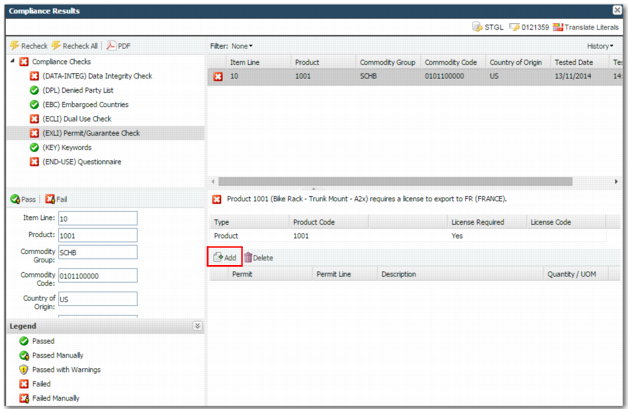
If the check fails you need to add a Permit/Guarantee to the item line. When you have the relevant permissions, you can add a permit to the transaction by clicking Add.
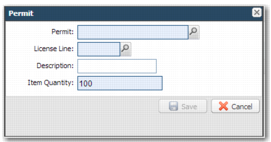
Add Permit Window
Permit
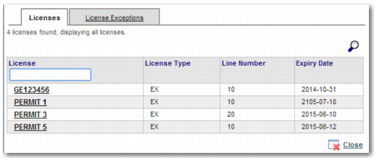
Enter a permit or select one using the lookup. You can only select from the permits already set up in the system by the administrator. This field is mandatory. The lookup displays a list of licenses, as in
Compliance Results - Add License.
Compliance Results - Add License
License Line
When you choose a valid permit, the system chooses the first permit line applicable to the transaction. When the details on the license conflict with the current item line, you cannot complete a save operation. This field is mandatory.
Description
The description defaults from the description in option XG. You can override this description.
Item Quantity
Enter the quantity of the item that the permit is required for. When the quantity on the item line exceeds the quantity left on the permit, an error message is returned. For each line to pass compliance, the quantity on the transaction line must be covered by the assigned permits. This field defaults to the quantity on the transaction line not already covered by a permit. The system validates that the quantity and value available on the permit line are not exceeded.
When you have completed the Permit screen, click Save and rerun compliance.
Prerequisites for Successfully Attaching a Permit
• The transaction must occur within the date range covered by the permit.
• You cannot use a permit to ship an item line when the product value or amount on the permit does not cover the amount or value on the item line.
• If you have a permit set up for a particular commodity code or product, you cannot use it for any other commodity code or product.
If you have a permit set up for a particular intermediate or ultimate consignee, you cannot assign the permit to a different consignee.