SMC Integration
This section describes how to use SMC integration with the new rating engine.
OverviewProvides an overview of how SMC helps you to calculate freight charges.
Configuring Connectivity System ValuesDescribes how to set up your system to communicate with SMC.
Setting up the ServiceDescribes how to set up a service that uses SMC functionality.
Importing SMC Services and RatesDescribes how to format and import services that use SMC.
TroubleshootingProvides details on some resources available when troubleshooting.
Sample SetupProvides a sample setup for SMC integration.
Overview
This section covers the SMC integration engine, which allows the LTL rating engine to connect with SMC RateWare XL (RXWL) software to obtain freight charges for the shipments.
SMC3 is the company providing the software that returns freight costings to the LTL rating engine. RateWare XL (RXWL) software is a web service. It is a platform-independent software component that is accessed over a network. It is described by WSDL and is capable of being accessed through standard network protocols such as—but not limited to—SOAP over HTTP.
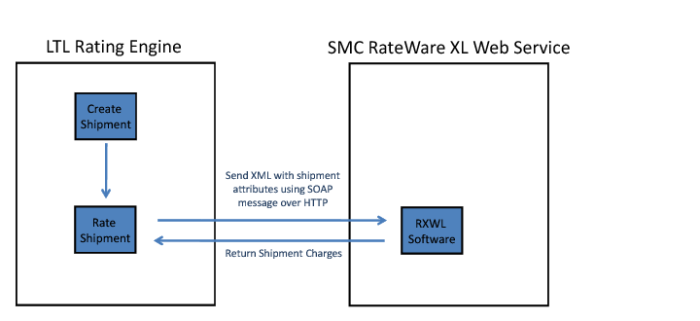
The LTL rating engine sends an XML request to SMC RXWL software. This software then returns an XML response. The rating engine interprets this XML and stamps the freight charges on the shipment, as displayed in
SMC Carrier Integration Solution Model.
SMC Carrier Integration Solution Model
RXWL and other SMC software products are licensed to users directly by SMC. Any warranties for these products are made by SMC. To configure SMC for use:
1 Create the system values for accessing the SMC RXWL software.
2 Create SMC services and rate discounts from scratch or upload SMC services and rate discounts from a file.