Origins
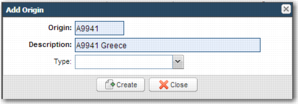
An origin is a set of related Packing Locations that share Routing Guide rules. Therefore, regardless of the physical location or the type of product, the shipper chooses the service in the same way. To add a new logical origin to the Routing Guide, click the Edit icon in the Origins section. The Add Origin pop-up window displays, as shown in
Add Origin.
Add Origin
Origin
Enter a meaningful code that reflects the purpose of the origin. The code can refer to a country, region, or other meaningful identifier.
Description
Enter an origin description. Generally, you include the origin code and the name of the origin. The description is displayed in the Origin Name column in the Origins area. Do not create an origin with a hyphen in the name because it causes an error in the setup.
Origin Type
This field is not in use; leave it blank.
Specify a unique name for the origin, add a description, and click Create. The new origin appears in the table.