Routing Criteria Tab
The routing criteria are divided into sections:
• Address Information
• Shipment Weight/Volume
• Pack Weight/Volume
• General Information
• Hazmat
Each section contains fields that correspond to shipment attributes. If the fields contain a value, the Routing Guide compares the value with the corresponding shipment attribute. If the field is blank, the corresponding shipment attribute is not considered when determining the Routing Guide rule that applies to the shipment. For the rule to apply to a shipment, all of the values specified in the rule must match the corresponding attributes in the shipment.
The shipment attributes are stored in a number of tables:
Shipment Attribute Tables
|
Table Name
|
Description
|
|
XMSHDR0
|
Shipment header attributes
|
|
XMSXPK0
|
Shipment pack attributes
|
|
XMSITM0
|
Shipment item attributes
|
|
XTZSTP0
|
Shipment type attributes
|
|
XMPROD0
|
Product attributes
|
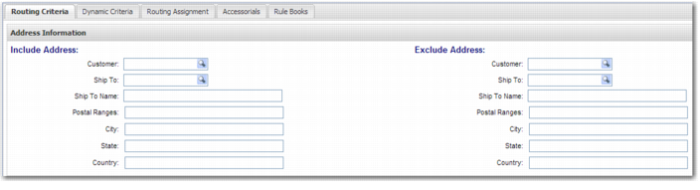
Address Information
The fields in the Address Information section are compared with the Customer and Ship To details of the shipment.
• Include Address: Use these fields to specify shipments that the Routing Guide rule applies to. For example, to create a Routing Guide rule that applies when shipping to the US, specify US in the Country field of the Include Address section.
• Exclude Address: Use these fields to specify shipments that the Routing Guide rule does not apply to. For example, to create a Routing Guide rule that applies when shipping to all countries apart from the US, specify US in the Country field of the Exclude Address section.
You can combine Include Address criteria with Exclude Address criteria in a single rule. For example, to create a Routing Guide rule that applies to all shipments to US states apart from California:
• Specify US in the country field of the Include Address section.
• Specify US in the country field of the Exclude Address section.
• Specify CA in the state field of the Exclude Address section.
Routing Criteria - Address Information
The following fields display in both the Include Address and Exclude Address sections:
Customer
The customer of the shipment.
Ship To
The Ship To party of the shipment.
Ship To Name
The Ship To name, or part of the Ship To name, of the shipment. For example, if you enter SMITH in this field, it matches both JOHN SMITH and SMITHS OF KANSAS.
Postal Ranges
A comma-separated list of postal code ranges.
Example: If this field contains 10300-10399,10800-10899,83110, then the rule refers to shipments with postal codes that are one of the following:
• Between 10300 and 10399
• Between 10800 and 10899
• 83110
City
A comma-separated list of city names that are listed in option PL. The validation of this field is not case-sensitive.
State
A comma-separated list of states. The validation of this field is not case-sensitive. The state codes that you enter here must match the format of state codes that exist in the partner address book.
Country
A comma-separated list of two-character ISO country codes. The validation of this field is not case-sensitive.
Typically, you configure a combination of address fields, such as:
• Country and Postal Ranges.
• Country and State.
• Country and City.
However, some combinations are not allowed because they do not make sense. These combinations are flagged when you try to include them in the Routing Guide rule. You cannot combine:
• Multiple countries and a postal code or postal code range.
• Multiple countries and state.
• Multiple countries and cities.
• Multiple states and postal codes. In this case, the postal code has precedence, and state does not apply.
• Multiple cities and a postal code or postal code range.
Shipment Weight/Volume
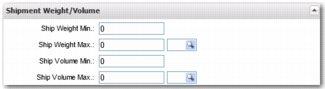
This criteria is used to determine whether a Routing Guide rule applies to a shipment based on the weight or volume of the shipment. You can specify that a rule applies when a shipment weighs less than 100 kilograms, or when a shipment measures more than 100 cubic centimeters in volume.
Routing Criteria - Shipment Weight/Volume
Ship Weight Min
The minimum shipment weight at which the Routing Guide rule applies.
Ship Weight Max
The maximum shipment weight at which the Routing Guide rule applies.
Shipment weight is determined from the pack weights of the shipment. If there are no packs on the shipment, the weight is taken from the XMSHDR0.SHGWGT field in the shipment header. Dimensional weight is not considered for Ship Weight Min and Ship Weight Max, as the dimensional weight calculation is not consistent across carriers and services.
The lookup field enables you to select the UOM of the values. If the lookup field is empty, the UOM is the default UOM configured in system values. The overall shipment weight is converted to this UOM. Then the comparison is made between the converted shipment weight and the minimum and maximum weight thresholds specified in Ship Weight Min and Ship Weight Max.
Default System UOM for Mass
Category | Key | Description |
SYSTEM | UOM - Default MASS | Unit of measure for mass. Possible values: Any unit of measure in the option UO, where the dimension scope is MASS. This is usually set up during the PRECISION implementation, and is typically set to lb or Kg. |
Ship Volume Min
The minimum shipment volume at which the Routing Guide rule applies.
Ship Volume Max
The maximum shipment volume at which the Routing Guide rule applies.
The shipment volume is determined from the pack volumes on the shipment. If there are no packs on the shipment, the volume is taken from the volume on the shipment header XMSHDR0.SHCUBE.
The lookup field enables you to select the UOM of the values used. If the lookup field is empty, the UOM is the default UOM configured in system values. The overall shipment volume is converted to this UOM. Then the comparison is made between the converted shipment volume and the minimum and maximum volume thresholds specified in Shipment Volume Min and Shipment Volume Max.
Default System UOM for Volume
Category | Key | Description |
SYSTEM | UOM - Default VOLUME | Unit of measure for volume. Possible values: Any unit of measure in the option UO, where the dimension scope is VOLUME. This is usually set up during the PRECISION implementation, and is typically set to FT3 or M3. |
Pack Weight/Volume
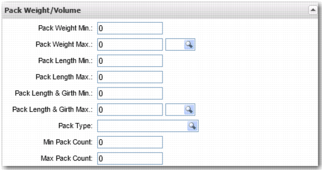
This criteria is used to determine whether a Routing Guide rule applies based on the weight, volume or dimensions of every package on the shipment. You can specify that a rule applies when: each pack in a shipment weighs less than 100 kilograms, or when each pack in a shipment measures more than 100 cubic centimeters in volume.
Routing Criteria - Pack Weight/Volume
Pack Weight Min
The minimum package weight at which the Routing Guide rule applies.
Pack Weight Max
The maximum package weight at which the Routing Guide rule applies.
Dimensional weight is not considered for Pack Weight Min and Pack Weight Max because the dimensional weight calculation is not consistent across carriers and services.
The lookup button enables you to choose the weight UOM of the values used. If the field is empty, the UOM is the default UOM configured in the system value displayed in
Default System UOM for Mass. The pack weight of the shipment is converted to this UOM. Then the comparison is made between the converted pack weight and the minimum and maximum weight thresholds specified in Pack Weight Min and Pack Weight Max.
Pack Length Min
The minimum package length at which the Routing Guide rule applies.
Pack Length Max
The maximum package length at which the Routing Guide rule applies.
The package length is defined as the length of the longest side on the package.
Pack Length & Girth Min
The minimum package length + girth at which the Routing Guide rule applies.
Pack Length & Girth Max
The maximum package length + girth at which the Routing Guide rule applies.
The combination of package length plus package girth is a typical consideration made by carriers to determine whether a package is an oversize package.
Girth is calculated as follows: Girth = 2 * (Width + Height).
The lookup button enables you to choose the UOM of the values. If the lookup field is empty, the UOM is the default UOM configured in the system value in
Default System UOM for Length. The package dimensions are converted to this UOM. Then the comparison is made between the converted package dimensions and the minimum and maximum dimension thresholds specified in Pack Length Min, Pack Length Max, Pack Length & Girth Min, and Pack Length & Girth Max.
Default System UOM for Length
Category | Key | Description |
SYSTEM | UOM - Default LENGTH | Unit of measure for length. Possible values: Any unit of measure in the option UO, where the dimension scope is LENGTH. This value is usually set up during the PRECISION implementation, and is typically set to IN, FT, CM or M. |
Pack Type
The shipment must contain at least one pack of the specified type before the Routing Guide rule applies. The type of each pack in a shipment is identified by the corresponding shipment pack field XMSXPK0.SXTYPE.
Min Pack Count
The minimum number of packages that must exist in the shipment for the Routing Guide rule to apply. The pack count is stored in the shipment header field XMSHDR0.SHPACK.
Max Pack Count
If the number of packages on the shipment exceeds this value, the Routing Guide does not apply.
The number of packages is based on the number of outermost packages on the shipment. Child packages are not considered.
General Information
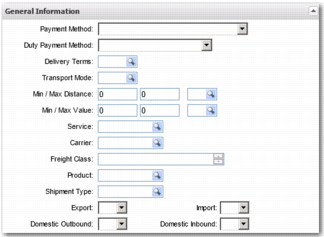
Use this criteria to determine whether a Routing Guide rule applies to a shipment based on general attributes of the shipment.
Routing Criteria - General Information
Payment Method
The currently assigned freight payment method, which is stored in XMSHDR0.SHTERM.
Duty Payment Method
The duty/tax payment method, which is stored in XMSHDR0.SHDUTYTERM.
Delivery Terms
The delivery terms, which are stored in XMSHDR0.SHDSTR.
Transport Mode
The transport mode, which is stored in XMSHDR0.SHMODE.
Min / Max Distance
The minimum and maximum shipment distances at which the Routing Guide rule applies. The shipment distance is stored in XMSHDR0.SHPDST. The lookup field next to the value range enables you to select a UOM for the values. If the lookup field is empty, the UOM is the default UOM configured in system values. The shipment distance is converted to this UOM and then the comparison is made between the converted distance and the minimum and maximum distance specified in Min/Max Distance.
Default System UOM for Distance
Category | Key | Description |
SYSTEM | UOM - DEFAULT DISTANCE | Unit of measure for distance. Possible values: Any unit of measure in the option UO, where the dimension scope is LENGTH. This value is usually set up during the PRECISION implementation, and is typically set to KM or ML. |
Min/Max Value
The minimum and maximum shipment values at which the Routing Guide rule applies. The shipment value is stored in XMSHDR0.SHVALU. The lookup field next to the range enables you to set the currency. If the currency is not specified, the system currency is used. The shipment value is converted to this currency, and then the values are compared.
Default System Currency
Category | Key | Description |
SYSTEM | DEFAULT CURRENCY | Default system currency. Possible values: Any currency in the option CU. |
Service
The service assigned to the shipment, which is stored in XMSHDR0.SHROUT.
Carrier
The carrier assigned to the shipment, which is stored in XMSHDR0.SHSHPC.
Freight Class
The freight class of an item line in the shipment. Specify a comma-separated list of freight classes. If one of the entries in the list matches one of the freight classes on the shipment item lines, the Routing Guide rule applies. Typically, the Freight Class field is used for LTL shipments. The freight class of each product in a shipment is identified by the corresponding shipment item field XMSITM0.SIFCLS.
Product
A product code associated with the shipment. There must be at least one occurrence of the product code on one shipment item line. The product code of each item line in a shipment is identified by the corresponding shipment item field XMSITM0.SIPROD.
Shipment Type
The shipment type, which is stored in the shipment header field XMSHDR0.SHTYPE.
Export
If you want the Routing Guide rule to apply to export shipments only, select Yes. Similarly, if you want the Routing Guide rule to apply to all shipments that are not for export, select No. The value in the shipment header field XMSHDR0.SHTYPE is used to find the master record, XTSZTP0. The field ZSEXP on the master record indicates whether the shipment is an export shipment.
Import
If you want the Routing Guide rule to apply to import shipments only, select Yes. Similarly, if you want the Routing Guide rule to apply to all shipments that are not for import, select No. The value in the shipment header field XMSHDR0.SHTYPE is used to find the master record, XTSZTP0. The field ZSIMP on the master record indicates whether the shipment is an import shipment.
Domestic Outbound
If you want the Routing Guide rule to apply to domestic outbound shipments only, select Yes. Similarly, if you want the Routing Guide rule to apply to all shipments that are not domestic outbound shipments, select No. The value in the shipment header field XMSHDR0.SHTYPE is used to find the master record, XTSZTP0. The field ZSDOUT on the master record indicates whether the shipment is a domestic outbound shipment.
Domestic Inbound
If you want the Routing Guide rule to apply to domestic inbound shipments only, select Yes. Similarly, if you want the Routing Guide rule to apply to all shipments that are not domestic inbound shipments, select No. The value in the shipment header field XMSHDR0.SHTYPE is used to find the master record, XTSZTP0. The field ZSDIN on the master record indicates whether the shipment is a domestic inbound shipment.
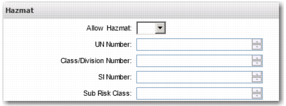
Hazmat
Use this criteria to determine whether a Routing Guide rule applies based on hazardous material information.
Routing Criteria: Hazmat
Allow Hazmat
If you want the Routing Guide rule to apply shipments that have hazardous material in a line item, select Yes. Similarly, if you want the Routing Guide rule to apply to shipments that do not have hazardous material in a line item, select No. When the field XMSITM0.SIDGI is set to yes, the product that it contains is hazardous material.
UN Number
The UN Number of a product on the shipment. There must be at least one occurrence of this UN number on the shipment. The UN number of each item line in a shipment is identified by the corresponding shipment item field XMSITM0.SICLAS.
Class/Division Number
The hazmat class of a product on the shipment. There must be at least one occurrence of this hazmat class on the shipment. The shipment item field XMSITM0.SICLAS is used to identify the UN number table field XMUNNO0.UNCLNO.
SI Number
The SI Number of a product on the shipment. There must be at least one occurrence of this SI number on the shipment. The shipment item field XMSITM0.SICLAS is used to identify the UN number table field XMUNNO0.UNSINO.
Sub Risk Class
The sub-risk class of a product on the shipment. There must be at least one occurrence of this SI number on the shipment. The shipment item field XMSITM0.SICLAS is used to identify the UN number table field XMUNNO0.UNSUBR.