Category | Key | Value |
SPSROUTE | FILTER FIELD - <UNIQUE_IDENTIFIER> | A set of values in the format Instruction 1|Instruction 2|Instruction 3. |
Filter | Format | Possible Values |
Table | TABLE=<TABLE_NAME> | XMSHDR0 - Shipment header. XMSITM0 - Shipment item. XMSXPK0 - Shipment pack. XMPROD0 - Product, which is related to the shipment item through SIPROD. |
Field | FIELD=<FIELD_NAME> | The <FIELD_NAME> must occur within the <TABLE_NAME> specified in the table filter. To find the list of tables, open the TB option. To find the list of fields for a table, click the table sub-options link to the left of the table name, and then click Fields. |
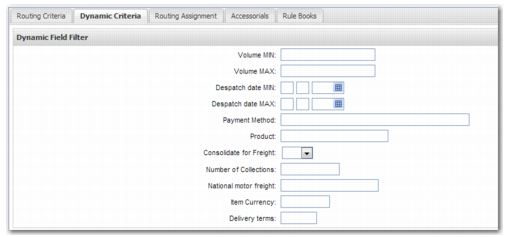
Label | LABEL=<LABEL_NAME> | This instruction determines the text that appears before the field on the Dynamic Criteria tab, and is optional. If you do not specify the label name, the Routing Guide determines the field name to display from the field definition. The field definition is available in the Fields sub-option of the table definition in option TB. |
Operation | OPER=<OPERATION_NAME> | MIN - Filter field used as a minimum value. MAX - Filter field used as a maximum value. EQUAL - Filter field used for direct comparisons. LOOKUP - Filter field used for lookup comparisons; a comma-separated list of values that the value can match. |
Record | REC=<RECORD_OCCURRENCE> This value determines the number of records that are compared with the user input. This filter is relevant when checking the values of shipment items, packs, and products, because there can be more than one of each of these records on a shipment. | ONE - When filtering, require only one record to meet the condition of the filter field. ALL - When filtering, require all the specified records to meet the condition of the filter field. If no REC type is specified, ALL is the default. |
Field Type | Set Up Value | Explanation |
Minimum Value | To filter based on the minimum value of a field: TABLE=XMSHDR0|FIELD=SHINSV|OPER=MIN | If you enter a value in the Shipment Insurance Min field on the Dynamic Criteria tab, the Routing Guide rule applies when the XMSHDR0.SHINSV field is greater than the specified value. |
Maximum Value | To filter based on the maximum value of a field: TABLE=XMSHDR0|FIELD=SHINSV|OPER=MAX | If you enter a value in the Shipment Insurance Max field on the Dynamic Criteria tab, the Routing Guide rule applies when the XMSHDR0.SHINSV field is less than the specified value. You can combine the minimum and maximum fields to specify a particular numerical range. You can do the same for date-based fields. |
Direct Comparison Value | To filter based on the field contents matching a specific value: TABLE=XMSHDR0|FIELD=SHUSR1|OPER=EQUAL | If you enter a value in the User Defined 1 field on the Dynamic Criteria tab, the Routing Guide rule applies when the XMSHDR0.SHUSR1 field is equal to the specified value. |
Lookup Comparison Value | To filter based on the field contents matching one of a set of values: TABLE=XMSHDR0|FIELD=SHUSR5|OPER=LOOKUP | If you enter a set of values in the User Defined 5 field on the Dynamic Criteria tab, the Routing Guide rule applies when the XMSHDR0.SHUSR5 field is equal to one of the specified values. |
A Check Against a Multi-occurrence Table | To filter based on a shipment attribute that can have multiple instances within a single shipment; for example, item records, packs, products: TABLE=XMPROD0|FIELD=PRLICR|OPER=EQUAL|REC=ONE | If you enter a value in the Product License field on the Dynamic Criteria tab, the Routing Guide rule applies when the XMPROD0.PRLICR field is equal to the value specified on at least one XMPROD0 record associated with the shipment. |