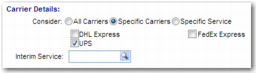
Use this field to specify the carriers to include in the rates search. To search all carriers for a suitable rate, select All Carriers. Select Specific Carriers to see a list of carriers, from which you can select a subset, as in
Specific Carriers. To specify a particular service to use, select Specific Service and enter the chosen service in the Service field. When you select Specific Service, you may see a field called Skip rate shop step. This field allows you to avoid rate shopping and confirm selection of the service.
If the shipment uses first-mile tracking, enter the service code for the initial leg. First-mile and last-mile tracking allow you to specify a particular location within a large office or factory complex.
Your administrator can configure a Skip rate shop step for this section. To skip the rate shopping step, select this field.