QAD Enterprise Asset Management 2017.1
>
User Guide
>
Purchasing
>
Quotes
>
Entering a Bid
Entering a Bid
In EAM, you can enter bids in the following submenus:
• Bids. Access the Bids submenu from the quote line. This menu allows you to enter the bids for a single item.
• Quote Vendor. Access the Quote Vendor submenu from the quote header. This menu allows you to enter the bids for all the vendors and all the lines. See
View the Vendor’s Bidding Details.
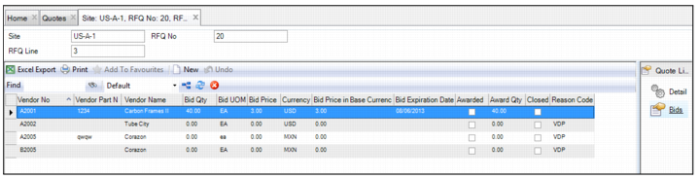
Follow these steps to enter a bid for a quote line in the Bids submenu:
1 Open the quote line and select the Bids submenu.
A list of approved vendors for the quote line is displayed.
2 Update the following information in the bid line.
Vendor Number
Defaults from the RFQ line part, if there is one defined for the part. Enter the vendor number associated with the bid. This number must be for a valid vendor in the system.
Vendor Part Number
Defaults from RFQ line part if there is one defined for the part. Enter a new number when supplied by the vendor. This field can be left blank.
Vendor Name
The vendor name associated with the vendor number entered.
Bid Quantity
Enter the quantity of the part that the vendor has indicated it can supply.
Bid UOM
Defaults from RFQ line part if there is one defined for the part. Enter the unit of measurement the vendor has indicated it can supply for the quantity of the requested part. For example, requested UOM each may equal bid UOM dozen.
Bid Price
Enter the vendor’s price for the item.
Currency
The currency associated with the vendor number entered. Enter the currency for the vendor’s pricing for the quote.
Bid Price in Base Currency.
Displays bid price for the part converted to the site’s base currency.
Bid Expiration Date
Enter the date the vendor states that the bid expires.
Awarded
The system updates this value when the Award action is executed. The bid line cannot be modified once awarded.
Award Qty
Specify the amount awarded to the vendor to supply. The amount cannot exceed the bid quantity that the vendor specifies.
Closed
The system updates when the Award action is executed. All bid lines are updated whether an amount was awarded or not.
Reason Code
If no Award Qty is specified for the bid line, select a user-defined reason from the lookup. For more information, see
Quote Reason.
Entering a Bid