QAD Enterprise Asset Management 2017.1
>
User Guide
>
Projects
>
Projects
>
Authorizing a Project
Authorizing a Project
Funding authorization and margin percentage authorization are the two types of project authorizations. The authorize option only applies if Proj Auth? is enabled on the Maintenance tab at General|Business Units|Sites. When this option is enabled, all projects must be authorized before cost can be expensed against them. See
Sites: Maintenance Tab.
To authorize a project, open the project and select Authorize from the Action menu. When you select the Authorize action, the project begins the approval routing process. If you do not have a large enough spending limit, the project is routed to the approval group.
Funding Authorization
Funding authorization is a type of project authorization in which you authorize the requested funding limit. If, as the initiator, you have a large enough project spending limit, and the approval group linked to the project has no quality user assigned, you can authorize the project without going through routing. Otherwise, the authorization request must go through the project approval group.
If the project’s authorized spending requires an increase, a reroute for a new approval is required.
Margin Percentage Authorization
Margin Approval provides an alternative authorization criteria for customer funded projects. With customer funded projects, the customer agrees to reimburse a specified amount against the cost of the project. Ideally, the customer funding covers or exceeds project costs providing a positive margin compared to company funding required for the project. Margin Approval enables project managers to authorize projects based on the planned margin.
When a project is approved based on funding for the budgeted costs, the higher the total costs are, the higher in the organization the project must be approved. Margin Approval provides an alternate basis to authorize projects based on the planned margin from customer funding. With Margin Approval, the lower the planned margin%, the higher in the organization the project must be approved.
When evaluating required budget for a customer funded project, management is responsible for evaluating planned costs versus customer contribution. EAM calculates the margin based on the funded amount from the customer compared to the authorized funding from within the company. Authorizing a project by margin percentage versus the traditional budget value gives management a clear picture on the level of company investment for a customer funded project. This knowledge enables management to make smart and informed spending decisions.
Set up the option to use Margin Approval for customer funded projects in General|Business Units| Sites|Maintenance tab. See
Sites: Maintenance Tab.
Viewing the Routing Status
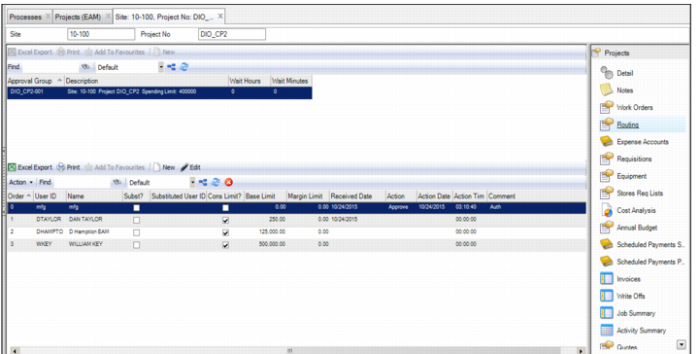
To view the authorization status for the project, open the project and select the Routing submenu.
Project Routing Submenu
The upper browse displays the routing records for the project. Each time this project has been routed for approval, a record of that routing appears in this browse.
The lower browse shows the list of approvers for the selected routing. It displays the users who approved the project and those who still need to approve the project. It also indicates if anyone has rejected the project.
Note: If anyone in the approval group had any important notes regarding this project, the notes are displayed in the Comment column.
The lower browse also captures any currency conversion that occurred if your domain’s base currency is different than the defined system approval limit currency. It displays the approval limit in both base and approval limit currencies, the exchange rate, and the date that a user took action on the project.
Note: If a user takes too long to approve a project, EAM provides a job in System Administration|Job Control that automatically forwards the routing approval to the next person on the list. See
Job Control Application.