Updating the Required Ship Schedule
Use Required Ship Schedule Update (7.5.5) to generate a new release of the RSS. If Include Seq in Req Ship Schedule is Yes on the scheduled order, the number of firm days indicated are included in the new RSS release. This program updates the RSS release with sequence schedule data only if Sequenced is Yes in the scheduled order being processed.
When you process a scheduled order line, the system checks whether it is associated with a sequence schedule line. This is determined by the Sequenced field setting in Customer Scheduled Order Maintenance (7.3.13).
Note: Sequenced schedules are not supported when using a trade sales arrangement; therefore, if Trade Sales is Yes, the Sequenced field is displayed only in Customer Scheduled Order Maintenance.
If the scheduled order line is part of a sequence schedule and Sequenced is Yes, sequence schedule-specific netting logic is used to create the RSS release. Netting logic methods work differently when sequences are associated with the scheduled order line.
Option 1: Use Shipping Schedule
The RSS is made up of the sequence schedule days specified in Firm Days in the Sequence Delivery Data frame in Customer Scheduled Order Maintenance. The shipping schedule is appended to the end of these sequence schedule days. The beginning of the ship schedule is replaced by the number of days specified in Firm Days on the scheduled order.
Option 2: Use Planning Schedule
The RSS is made up of the sequence schedule days specified. The planning schedule is appended to the end of the sequence schedule dates. The beginning of the planning schedule is replaced by the number of days specified in Firm Days on the scheduled order.
Option 3: Replace Logic
The RSS is made up of the sequence schedule days specified, followed by the shipping schedule, then the planning schedule.
If you are using this option and Use Ship/Plan PCR is Yes in Customer Schedules Control (7.3.24), the system maintains cumulative quantities for the sequence, shipping, planning, and required ship schedules.
The cumulative quantity for the previous week’s planning schedule (prior cumulative quantity) is compared with the current RSS cumulative quantity. If there is a difference because the planning schedule cumulative quantity is greater, the system adds this difference to the current week’s planning schedule cumulative quantity. This assures that the current week’s planning schedule cumulative quantity is always up to date.
Option 4: Consume Logic
The RSS is made up of the sequence schedule days specified, followed by the shipping schedule, then the planning schedule. The system maintains cumulative quantities for the sequence, shipping, planning, and required ship schedules. The cumulative quantities of the sequence and shipping schedules are used to ensure that the weekly requirements from the planning schedule are accounted for or consumed.
The system follows these steps when generating the RSS:
• The sequence schedule is processed first. Cumulative quantities are calculated for the sequence schedule.
• The shipping schedule is processed next. The dates and quantities from the shipping schedule are appended to the end of the sequence schedule.
• The planning schedule is processed next. The cumulative quantities for each week of the planning schedule are compared to the weekly quantity of the sequence and shipping schedule.
• If the weekly cumulative quantity of the sequence or shipping schedule is less than the weekly planning quantity, that schedule is updated to match weekly planning quantity. To do this, the system adjusts the last entry in the week by the difference of the two schedules. The remaining dates and quantities from the planning schedule are appended to the end of the shipping schedule.
• If the weekly cumulative quantity of the sequence/shipping schedule is greater than or equal to the planning schedule for the week, no adjustments are made.
• The dates and quantities from the planning schedule are appended to the end of the sequence/shipping schedule.
Calculations with Netting Logic 1, 2, or 3
If you are using netting logic 1, 2, or 3 and a sequence or shipping schedule ends in the middle of the weekly planning interval, any open requirements on the planning schedule are moved to the next available open date using the following steps:
• The system first calculates the amount of weekly requirements from the sequence/shipping schedule.
• It then compares this to the weekly planning requirements. If the weekly requirements exceed the sequence and/or shipping scheduled requirements, the difference is added to the next open date.
• The system calculates the next open date using the customer calendar and adding one day to the last sequence or shipping requirement in the week.
• A new requirement is created on this day and contains the open requirements from the weekly planning schedule. If the next open date falls into the following week, no adjustments are made because the week has ended.
Example: The planning schedule begins on Monday, the first day of the week. The sequence/shipping schedule ends on Wednesday. The schedules overlap three days: Monday, Tuesday, and Wednesday. The system finds the difference between the three-day requirements from the sequence/shipping schedule and the three-day requirements for the planning schedule. If the planning schedule requirements exceed the sequence/shipping schedule requirements, it moves that amount of planning requirements to Thursday, the next available open date.
When you generate an RSS release that contains sequences, the following sections appear on the RSS report:
• Sequence Schedule Required Quantities
• Netting Options
• Seq Schedule Adjustment For Plan Schedule Overlap
• Combined Schedule
• Schedule Dates Backward Adjusted for Customer or Ship-To Calendar
Netting Logic 3 with SDP Codes
The system creates the RSS differently when you use netting logic 3 with the Use Ship/Plan PCR field in Container/Shipper Control. This field lets you specify whether the system considers prior cumulative requirements (PCR) when it reconciles shipping and planning schedules to create the RSS. The PCR quantity depicts all quantities needed before the current schedule goes into effect. Adding the PCR quantity can greatly increase the demand, particularly when the system adds the PCR quantity along with consumed planning quantities.
Updating Specific Required Ship Schedules
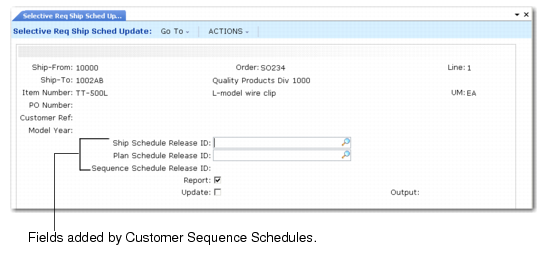
Use Selective Required Ship Schedule Update (7.5.6) to create a specific RSS release that includes any associated sequence schedule. Specify the sequence schedule release ID to use in Sequence Schedule Release ID. Only sequence lines associated with the specific scheduled order lines are used. Required ship schedules that include sequence schedule data are generated as described in the previous section.
Sequence Schedule Release ID Field