Manually Updating a Schedule Release
Use Supplier Planning Schedule Maint (5.5.7.6) or Supplier Shipping Schedule Maint (5.5.7.7) to modify planning or shipping schedules. You can change schedule detail data such as requirement dates, quantities, firm or planned status, and fab and raw authorization quantities and dates.
You cannot update a supplier shipping or planning schedule release if the scheduled receipt date is outside of the scheduled order line effective date range. Scheduled orders have both header and line start and end effective dates. When processing the order, the system uses the line start date and the later of the header or line end date as the active order line date range.
Typically, Schedule Update from MRP (5.5.3.1) is used to generate planning and shipping schedules, but these two maintenance programs can also be used to manually create them.
When Auto Update Plan From Ship is Yes in Supplier Schedule Control (5.5.7.24), supplier planning schedules are automatically updated by the system when you make changes to their associated shipping schedules.
When manual changes are made to the shipping schedule or the planning schedule, these changes are used to automatically update the corresponding type 4 supplier schedule so they can be taken into account by MRP the next time it is run. This update takes place regardless of any control program setting.
The following discussion focuses on Supplier Planning Schedule Maintenance. Navigation and data entry in Supplier Shipping Schedule Maintenance is almost the same. Any differences are noted.
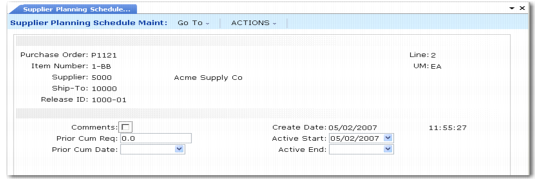
1 In the first frame, use the Purchase Order, Item Number, Supplier, Ship-To, and Line fields to identify a scheduled order. Enter the release to modify or leave Release ID blank and the current release ID defaults. If you are manually creating a new release for this schedule, enter a new release ID.
Supplier Planning Schedule Maintenance, (5.5.7.6), Cumulative Information
The next frame shows the prior cumulative required and cumulative date. This is the total quantity you have requested from the supplier as of a certain date. The active start and end dates show when this release was active. The current active release has no date in the Active End field.
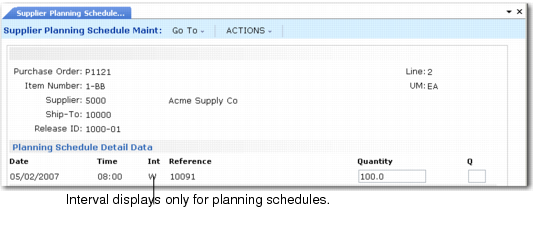
2 The Schedule Detail Data frame displays next. In Supplier Shipping Schedule Maint this frame displays without the Int field.
Planning Schedule Detail Data Frame
Use this frame to create or modify schedule delivery dates, times, references, and firm or planned quantities. For planning schedules, you can also change the delivery interval type.
This is the last frame of Supplier Shipping Schedule Maint.
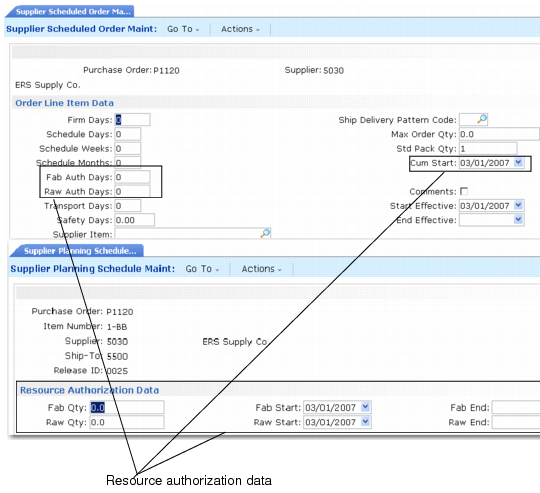
The fab and raw start and end dates indicate when the supplier is authorized to begin manufacturing or to begin purchasing raw materials to fill this order.
The Fab Qty indicates the quantity of finished items the supplier is authorized to produce for the time period. The Raw Qty indicates the quantity of manufactured items for which the supplier is authorized to purchase raw materials for the time period.
Supplier Scheduled Order Maintenance (5.5.1.13) and Resource Authorization (5.5.7.7) Frames
Any changes you make in the Resource Authorization Data frame are applied only to this release of the planning schedule. To make changes that affect other releases, update the order in Supplier Scheduled Order Maintenance.