Maintaining Simulation Plans
Like operations plans, you can manipulate simulation plans at the site and production line levels.
Changing Site Simulation Plans
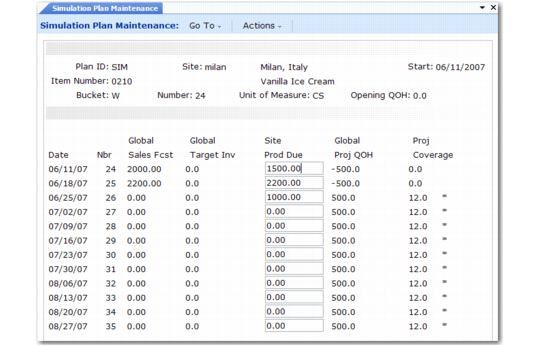
To view the plan and simulate changes to production due quantities, use Simulation Plan Maintenance (33.17.13). To help you make more informed decisions, the screen displays the global sales forecasts and global target inventory levels. As you change quantities, the system recalculates projected quantity on hand and projected weeks of coverage.
You can also use Simulation Plan Maintenance to delete a simulation plan, either for an entire year, or for only specific periods within the year. For example, you may have to do this if an item becomes obsolete.
Simulation Plan Maintenance (33.17.13)
The fields in Simulation Plan Maintenance are identical to those in Operations Plan Maintenance.
Use two programs to view simulated plan information:
• Simulation Plan Inquiry (33.17.14) shows an item’s site simulation plan much as it appears on the Simulation Plan Maintenance (33.17.13) screen.
• Simulation Summary Report (33.17.6) shows plans for ranges of items, which you can choose by starting plan week, product line, item group, item type, and buyer/planner. You can limit the report to items whose projected coverage is greater or less than the average coverage factor.
Changing Line Simulation Plans
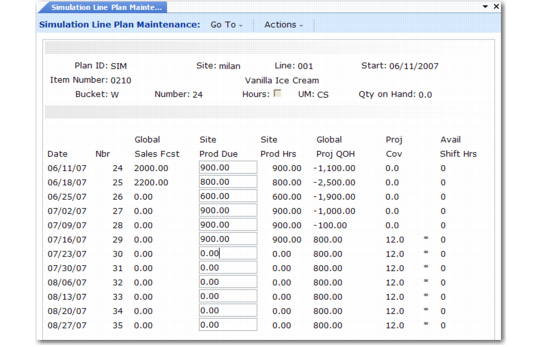
Use Simulation Line Plan Maintenance (33.17.16) to view the plan and simulate changes to production due quantities at the production line level.
Simulation Line Plan Maintenance (33.17.16)
The fields in Simulation Line Plan Maintenance are identical to those in Operations Plan Line Maintenance.
Use Simulation Line Plan Inquiry (33.17.17) to display an item’s line simulation plan.
Changing Simulation Line Schedules
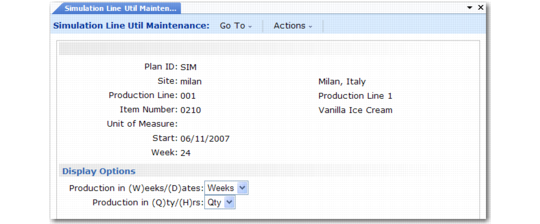
Simulation Line Util Maintenance (33.17.19) simulates balancing the operations plan against available line capacity. You can view and change scheduled production in either hours or quantities. As you make changes, the screen recalculates coverage, capacity, and utilization.
Simulation Line Utilization Maintenance (33.17.19)
The multiple screens and fields in the program are identical to those in Line Utilization Maintenance.
Simulation Line Util Report (33.17.20) shows line scheduling information for a range of sites and production lines. You can print production due in either item quantities or line production hours.