DRP Life Cycle
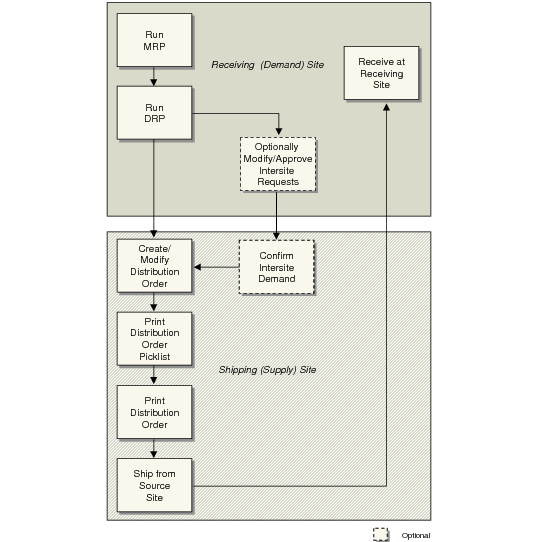
Intersite Request and Distribution Order Life Cycle illustrates the process DRP uses to generate intersite requests at the receiving site, which are then referenced on distribution orders and filled at the shipping site.
Intersite Request and Distribution Order Life Cycle
1 Initial demand for DRP-planned items at the receiving (demand) site is calculated by MRP or generated by sales orders and forecasts.
2 When DRP is run, it generates planned intersite requests at the demand site. Review DRP action messages with DRP Action Message Review/Update (12.13.5).
3 Planners modify and approve intersite requests at the demand site. Because DRP- and MRP-generated requests are approved by default, this step is optional. Using Planned Intersite Request Approval (12.13.10) to manually approve intersite requests changes their status from Planned to Firm Planned. The system does not alter these requests when MRP or DRP is run again.
4 Intersite requests generated by DRP create item demand at source (supply) sites through relationships set up with network codes. When the network code for a required item divides demand among multiple sites using a supply percent, the system generates item demand at each supply site in the network. See
Source Networks.
5 Item demand at the supply site is considered as gross requirements for requested items when MRP is run at that site. Typically, the supply site uses master scheduling functions to manage these requirements.
6 Optionally, review and manually confirm item demand at the supply site using Intersite Demand Confirmation (12.17.1). If needed, you can also create a new intersite request in this program.
At this time, you can adjust some intersite request details, such as the item due date, transportation code, inventory quantities, and financial data. Changes to intersite requests at source sites are reflected on corresponding intersite requests at the demand site. Similarly, changes to intersite requests at the demand site are visible at supply sites.
Requests that have been modified or confirmed at the supply site have a status of Exploded and are not replanned when DRP is next run.
7 At the supply site, create distribution orders and reference one or more intersite requests. This process is similar to the way purchase requisitions are combined into purchase orders. Use Distribution Order Maintenance (12.17.14), Distribution Order Workbench (12.17.13), or Distribution Order Processing (12.17.21). You can also create intersite requests dynamically in Distribution Order Maintenance or Distribution Order Processing.
Note: Distribution Order Processing lets you create an order, allocate and pick items, and ship the order from one function. See
here.
8 At the supply site, print orders with Distribution Order Print (12.17.18). Pick items by generating a picklist with Distribution Order Picklist Print (12.17.19).
Note: You can also pick items during DO maintenance.
9 Ship orders with Distribution Order Shipments (12.17.22). You can create shippers for a DO when a valid shipping group is associated with the ship-from and ship-to sites.
10 At the receiving site, use Distributed Order Receipt (12.15.20) to record the receipt of distribution order shipments.
11 Use DO Shipment Reconciliation (12.17.17) to display shipments with a receipt amount that differs from the shipment amount.