Running Reports
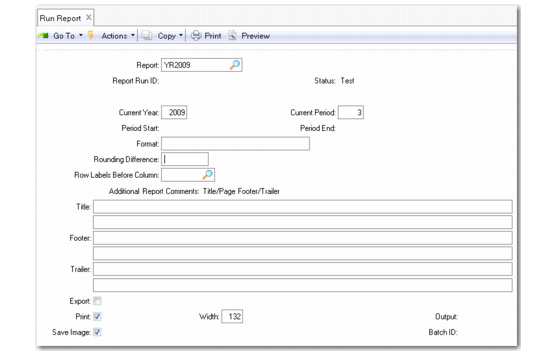
Run Report (25.17.17) generates a report based on a report definition set up in Report Maintenance. The process retrieves data, calculates formulas, performs rounding, and applies formatting to create a report image.
Important: After posting general ledger and before running any reports, be sure to run Synchronize G/L Data.
Run Report (25.17.17)
Report
Enter the name of a valid defined report.
Report Run ID, Status
System-generated values, based on Report. This is the report that runs.
Current Year and Current Period
Enter a specific year/period in these fields, or, if running the report in batch mode, enter zero. The system uses these fields to determine the year and period of columns that were set up relative to the current year/period.
However, for reports run in the batch mode, the system defaults to Current Year/Period from GL Report Writer Control (25.17.24). Also, the system uses these fields for columns set up with a rolling budget, unless the columns were set up with a specific year/period.
Period Start and Period End
The fiscal period’s start and end dates. When they are created, GL transactions have an effective date. The system determines the fiscal period to which this transaction applies by finding these dates in the calendar’s period start/end range. GL periods cannot overlap.
Each calendar period starts and ends on a specified date. Calendar periods can be monthly, quarterly, or any combination. Monthly calendar numbers usually correspond to the month number (1-12). The period number can also represent the week or day number that the period starts/ends. For example, period 1 may span July 1 to July 31, or it may span July 15 to August 15. If you miss any days (such as February 29), the system does not let you post transactions on that date.
Format
Specify the global format for report cells that allow override. Numeric cells have this format if Allow Override is set to Yes in both their row and column definitions. This field accepts any valid numeric format, as defined in the Progress language.
Rounding Difference
The rounding method used on this report.
Row Labels Before Column
This field determines where the row labels appear, relative to the column you specify. You can define the column number or specify the Last column.
Title, Footer, Trailer
Optionally, add one or two additional text lines to your report title, footer, or trailer. The text you enter is printed above the text specified in Report Maintenance.
Export
Enter Yes to export the report to an ASCII file. Exporting is used to send a report to a file that can be read with any software product that reads ASCII delimited format.
Print
Enter Yes to format the report for printing at your printer.
Save Image
Enter Yes to save the report image after output. The report image can be used to reproduce all or part of a report output, without executing the report again.
Width
Enter the printer width in characters. The system uses Width to determine how many report columns fit on a given page. Columns that do not fit on a page overflow to the next page. The default is 132.
Output
The output may be a printer, terminal (character), window (GUI), or file name. Normally, a report prints 132 characters across the page. On a standard screen, the report wraps. If your screen supports compressed print mode, modify the printer settings in Printer Setup Maintenance (36.13.2).
Batch ID
Enter a batch ID to queue the report for later processing.
To run the same reports on a regular basis, create a permanent batch. This requires that the column period buckets have relative data references. Use Run Report with the year and period set to zero. GL Report Writer then uses year and period values from GL Control.