Copying and Combining Forecasts
To create new forecasts by copying or combining existing detail records, use Simulation to Simulation Copy (22.7.11) or Single Item Simulation Copy (22.7.12).
Simulation to Simulation Copy (22.7.11)
These functions let you copy, replace, or combine forecast detail records. With Simulation to Simulation Copy, you can copy forecast records for multiple items in a single transaction, whereas with Single Item to Simulation Copy you can copy only for a single item.
Note: To manually adjust forecast detail records created using these functions, use Detail Forecast Maintenance (22.7.7).See
Modifying Forecast Results.
Multipliers
When copying or combining forecast detail records using Simulation to Simulation Copy (22.7.11) or Single Item Simulation Copy (22.7.12), you can apply multipliers to the resulting forecast quantities. Multipliers, also called multiplicative factors, allow you to increase, decrease, or scale forecast quantities by a specified percentage. Multipliers can be useful when you have prior knowledge of an unscheduled demand, such as a future sales promotion.
There are three types of multipliers:
• Base Increase/Decrease
• Scale
• Trend
In Single Item Simulation Copy, multipliers let you scale the forecast results for a new item as some percentage of an old item. This is useful when you want to match the seasonal demand, but not the quantity, of an old item for a new item.
Simulation to Simulation Copy lets you apply multipliers to a range of items.
Base Increase/Decrease
The percentage by which a forecast quantity is increased or decreased. A negative percentage indicates that the quantity is decreased.
Base Increase/ Decrease Multiplier
Month | Units | 10% | –10% |
January | 100 | 110 | 90 |
February | 150 | 165 | 135 |
March | 120 | 132 | 108 |
Scale
The percentage by which a forecast quantity is multiplied, or scaled. This value cannot be negative.
Scale Multiplier
Month | Units | 10% | –10% |
January | 100 | 10 | n/a |
February | 150 | 15 | n/a |
March | 120 | 12 | n/a |
Trend
The percentage by which a forecast quantity increases each month. A negative percentage decreases the quantity over time.
Trend Multiplier
Month | Units | 10% | –10% | |
January | 100 | 110 | 90 | = 100 +/– (100 * 10%) |
February | 150 | 180 | 120 | = 150 +/– (150 * 20%) |
March | 120 | 156 | 84 | = 120 +/– (120 * 30%) |
You can use more than one multiplier at a time. The effect of multiple factors is cumulative. Base Increase/Decrease is applied first, Scale second, and Trend third.
When you are replacing an existing detail record and apply multipliers to the source quantities, the results overwrite the quantities in the target detail record.
When you are combining records and use a multiplier, the multiplier is applied to the source quantity and the result added to the target quantity. The factor is not applied to the combined source and target quantity.
Simulation To Simulation Copy
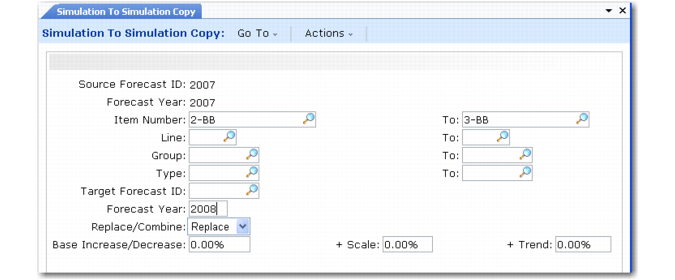
Use Simulation to Simulation Copy (22.7.11) to copy an existing forecast detail record to another forecast ID or to combine several forecast detail records into a single detail record.
To use this function, you must specify a source forecast ID identifying the forecast detail record to copy to or combine with the target record, and a target forecast ID identifying the forecast detail record to which the source information is copied. A criteria template must exist for the specified source forecast ID.
The target forecast ID you specify does not need to correspond to an existing forecast detail record or criteria template. If a corresponding record does exist for the specified target ID, its forecast method must be 00. If no such record exists, the system creates a target forecast detail record with a method of 00.
If you want to copy detail records for a subset of the items in the source record, you can also specify an item range to be copied.
Note: If the item ranges for the target and source records differ, then the target record’s range is expanded.
The system combines or copies forecast records only in terms of item units. The Combine/Replace field indicates whether to replace the target forecast quantity with the source quantity or combine the target and source quantities. When you combine forecast quantities, the quantity for an item in the source detail record is added to the quantity for that item in the target detail record. When you replace forecast quantities, the quantity for an item in the source record replaces the quantity for that item in the target detail record.
Note: You cannot separate combined forecast records.
You can increase, decrease, or scale the resulting detail record, or multiply the detail record by a trend factor.
See
Multipliers for details.
Using this function to copy or combine forecast detail records automatically deletes the original, or target, forecast record and replaces it with the copied or combined record. The source detail record and criteria template remain unchanged.
Single Item Simulation Copy
Single Item Simulation Copy (22.7.12) enables you to create a forecast for a single item based on the historical sales data for another item. Since there is often little or no sales history for new items, you may want to use the demand history for a similar product to produce forecasts for a new product.
Note: If the Target Forecast ID, Item Number, or Forecast Year fields are left blank, the system sets them to the target values.
You must specify an item number to copy from the source detail record. This item must exist in the item master.
Forecast records are copied only in terms of units. The source and target items must have identical units of measure, or a unit of measure conversion must exist.
If the specified target forecast detail record already exists in the system, its forecast method must be 00. If the target does not exist, the system creates a forecast detail record with a method of 00.
When copying forecast records, forecast amounts can be multiplied by a Base Increase/Decrease, Scale, or Trend factor.
During a combine or replace, the original target forecast record and criteria template are overwritten. The source record is not altered.