Making Forecast Data Visible to MRP
Forecasts generated using forecast simulation functions or loaded into forecasting simulation functions using the CIM interface are stored in forecast detail records, whereas MRP uses summary forecast records to drive its demand calculations.
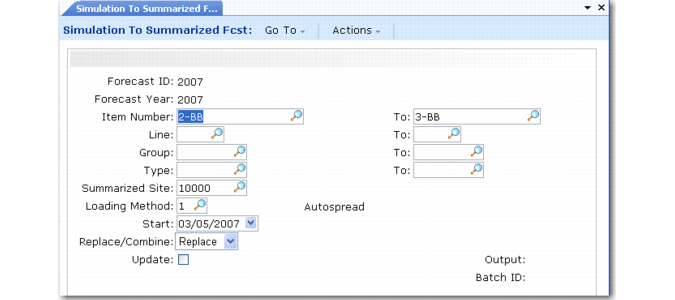
Use Simulation to Summarized Forecast (22.7.13) to load forecast quantities into the summary forecast records used by MRP. This program uses the forecast detail records to create new summary forecast records, replace old summary records, or combine with existing summary forecasts.
Simulation to Summarized Forecast (22.7.13)
Forecast detail records are identified by forecast ID, year, and item, whereas summary forecast records are identified by item, site, and year.
Since MRP is site-specific, you must specify a summary site to update. This site may be different from the order line site specified on the criteria template. When a forecast is for a group of items, you can generate summary forecast records for one item, a subset of items, or all items in the detail record.
Forecast detail records are copied to summary forecasts only in terms of units.
Note: You can combine multiple detail records into one summary forecast, but this is not recommended, since the combined result is not a valid forecast.
Updates to the summary forecasts are permanent and cannot be undone. You should run Simulation to Summarized Forecast in report mode before performing the update.
You can manually modify summary forecast quantities as needed, using Forecast Maintenance (22.1) or Forecast Worksheet Maintenance (22.2).
Loading Methods
When loading forecast detail records into summary forecasts, you can specify one of three loading methods that the system uses to break the monthly forecast quantities into the weekly quantities used by MRP.
The three loading methods are:
• Autospread (1). Monthly forecasts are broken into daily averages and summed into weekly buckets starting on Monday. Unless the day that you are loading forecast is a Monday, the loaded forecast begins on the following Monday. This is the default loading method.
• Load Last Week (2). Monthly forecast is loaded into the last Monday of the forecast month.
• Load First Week (3). Monthly forecast is loaded into the first Monday of the forecast month.