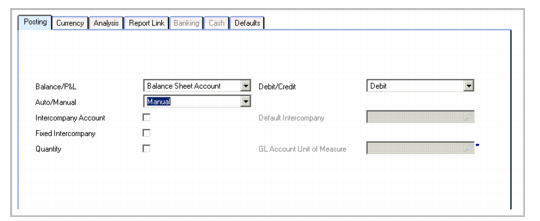
Posting Tab
Use the Posting tab to set posting attributes for the account.
GL Account, Posting Tab
Field Descriptions
Balance/P&L
Indicate whether this is a Balance or Profit and Loss account.
Profit and loss accounts are cleared at year-end closing, and the total balance of profit and loss is transferred to a profit and loss transfer balance account.
This selection is available for standard account types, and for certain system type accounts: Rounding Differences, Realized and Unrealized Exchange Profit and Loss. All other account types are balance accounts by default, and this field is disabled.
Important: For standard accounts, you cannot modify the Balance/P&L field once transactions have been posted to the GL account.
Debit/Credit
Select the posting designation for this account.
The posting designation is a convenient way of identifying accounts that hold only debit postings or only credit postings; however, the designation is not binding. You can hold both debit and credit postings in the same account. The system also supports negative debits and negative credits as a correction of a previous transaction.
Auto/Manual
Use the Auto/Manual field to indicate whether journal entries on this account must only be created automatically by the system or whether they can be created manually in, for example, Journal Entry Create, Banking Entry Allocate to GL, Receiver Matching Create, or the Matching tab of Supplier Invoice.
If you select Automatic, the account cannot be used in a manual posting line entry created in, for example, Journal Entry Create or Supplier Invoice Allocate.
If you select Manual, the account can be used for all manual posting line entries, as well as in programs that create transactions automatically.
Important: You cannot modify the value in the Auto/Manual field after transactions have been posted to the GL account.
Manual posting is available for the following types of account:
• Bank
• Cash
• Cross-company
• Fixed Asset
• Open Items
• Standard
• Tax
Posting is automatic for all other account types. System accounts and control accounts must use automatic posting with the exception of the Conversion system account, which has manual posting.
Example:
For a GL account of type Bank, you can set the Auto/Manual field to Automatic or Manual.
When the Auto/Manual field is set to Automatic, transactions on the bank GL account can only be entered using Banking Entry Create. If the Auto/Manual field is set to Manual, you can also enter transactions on the bank GL account using Journal Entry Create.
Intercompany Account
Select to designate the account as an intercompany account. This field is always selected for cross-company control accounts and cannot be modified.
The intercompany identifier distinguishes organizations that are members of a group of entities that trade with each other. When the field is selected, you can choose to enter an intercompany code for postings to this account. Intercompany codes are configured on the General tab of the business relation. See
Creating Business Relations.
Default Intercompany
Optionally specify the default intercompany code associated with the GL account. This field becomes active when you select the Intercompany Account field. This field is used only if the system cannot find an intercompany code from the business relation associated with a transaction.
Fixed Intercompany
Select this field if you do not want the default intercompany code to be changed during manual entry.
When this field is clear, the system uses any intercompany code associated with the business relation in the transaction, rather than the code associated with the account.
Quantity
Select this field if you want to store quantity values for posting lines for this account. When selected, the GL Account Unit of Measure field is enabled in postings using this account, and you must specify a quantity and unit of measure in the posting lines.
GL Account Unit of Measure
When Quantity is selected, specify a unit of measure for quantities specified for this account. By default, all quantities on the account are assumed to be in the same unit of measure. See
GL Account Unit of Measure.